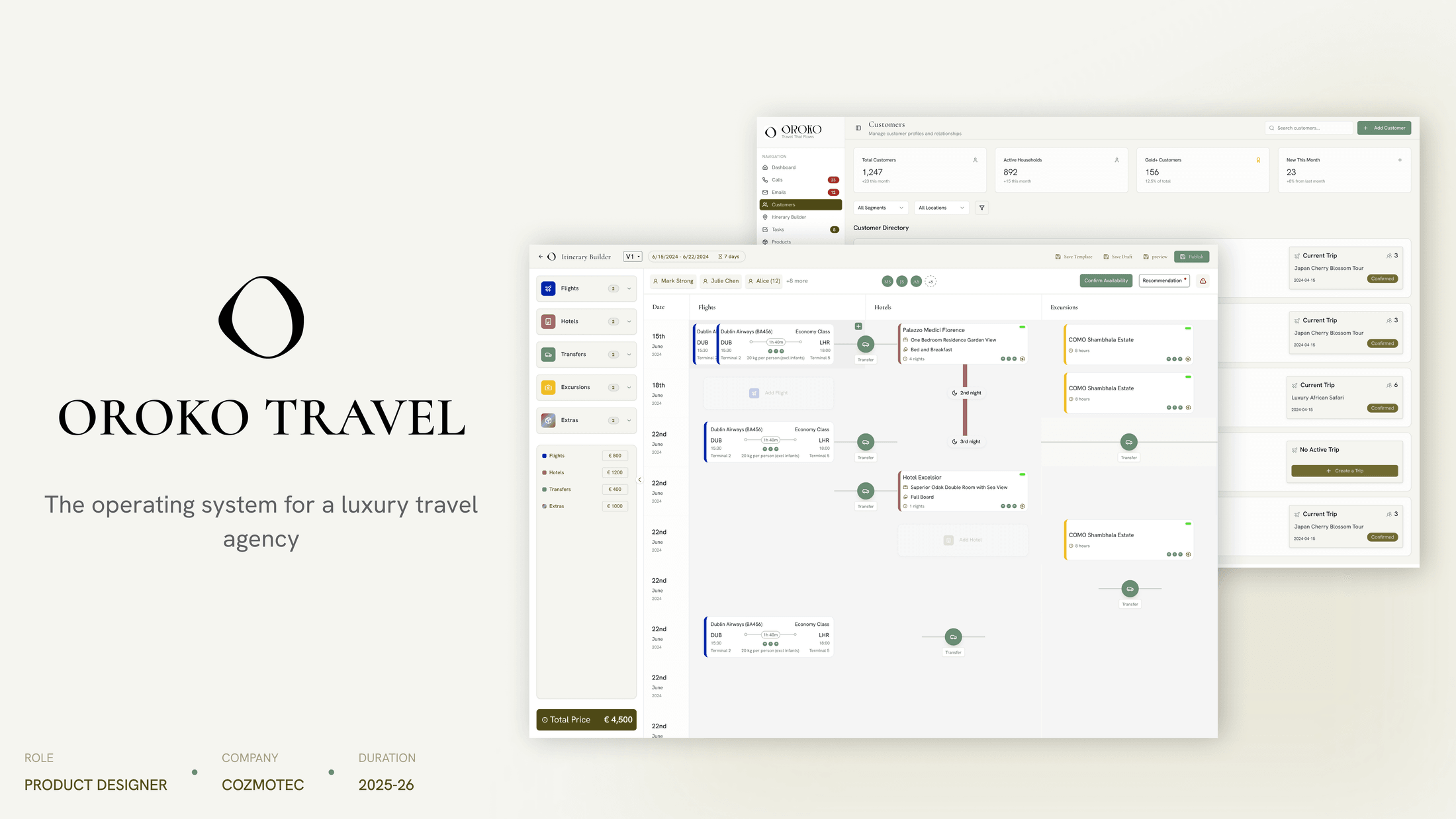
Oroko Travel is a Dublin luxury travel agency — bespoke trips to the Cyclades, the Amalfi Coast, Japan. Their work runs on personal service, but the tools they used scattered every part of it. I designed one connected system — Oroko Aura — enquiries, customers, bookings, suppliers, invoicing and the itinerary builder, all linked — so a designer builds the trip and manages the relationship behind it as one. Then they came back for a second, private version — Oroko Private — for their most high-profile clients. I was the sole product designer across both — though never designing in a vacuum: I worked in a constant back-and-forth with the PM about what was actually possible to build, so what I drew could really get made.
01
Context & Problem
Tiger Bay could book a trip. It couldn't help you know the customer.
Oroko ran on Tiger Bay — old, slow, and split into disconnected parts. The trip in one place, the customer in another, the calls and emails somewhere else. Even the customer list never held the full story.
For a luxury agency, that's the core problem: the whole job is personal service, and you can't give it when everything you know about a client is scattered across tools.
So the goal wasn't a better Tiger Bay. It was one connected system — customer, trip, suppliers, payments and every conversation in one place — so a designer plans the trip and looks after the client at once.
02
Discovery
There was no brief. I learned the work by watching it.
I sat in on real sales calls and pulled Tiger Bay apart screen by screen — noting where people gave up and switched to email or a spreadsheet. The requirements didn't arrive in a document; they surfaced in the back-and-forth.
One thing stood out. Old systems treat a trip as a list of bookings — flight, hotel, transfer, in a row. But designers think in days: day one they land, day two they drive to the coast, day three is free. So I built the itinerary around days, not a list — each day holds everything happening that day.
Oroko wanted it to feel like Tiger Bay, so no one had to relearn. I went the other way — clear sections that link into each other: open a customer and their trips, calls and payments are right there. Familiar isn't the same as easy.
03
Why build it, not buy it
The fair question before building: why not just buy off the shelf?
There's plenty of software for travel agencies — Travefy, Lemax, Tourplan — and we looked. But they're built for high-volume operators selling the same packaged trip again and again. Oroko is the opposite: every trip is bespoke, and tools built for volume don't fit a business built on personal service.
The closer ones still only solve a slice — an itinerary here, a booking system there. None gave Oroko what it needed: one system, shaped around their way of working, where the customer, the trip and every conversation are connected. That only comes from building it.
04
Information Architecture
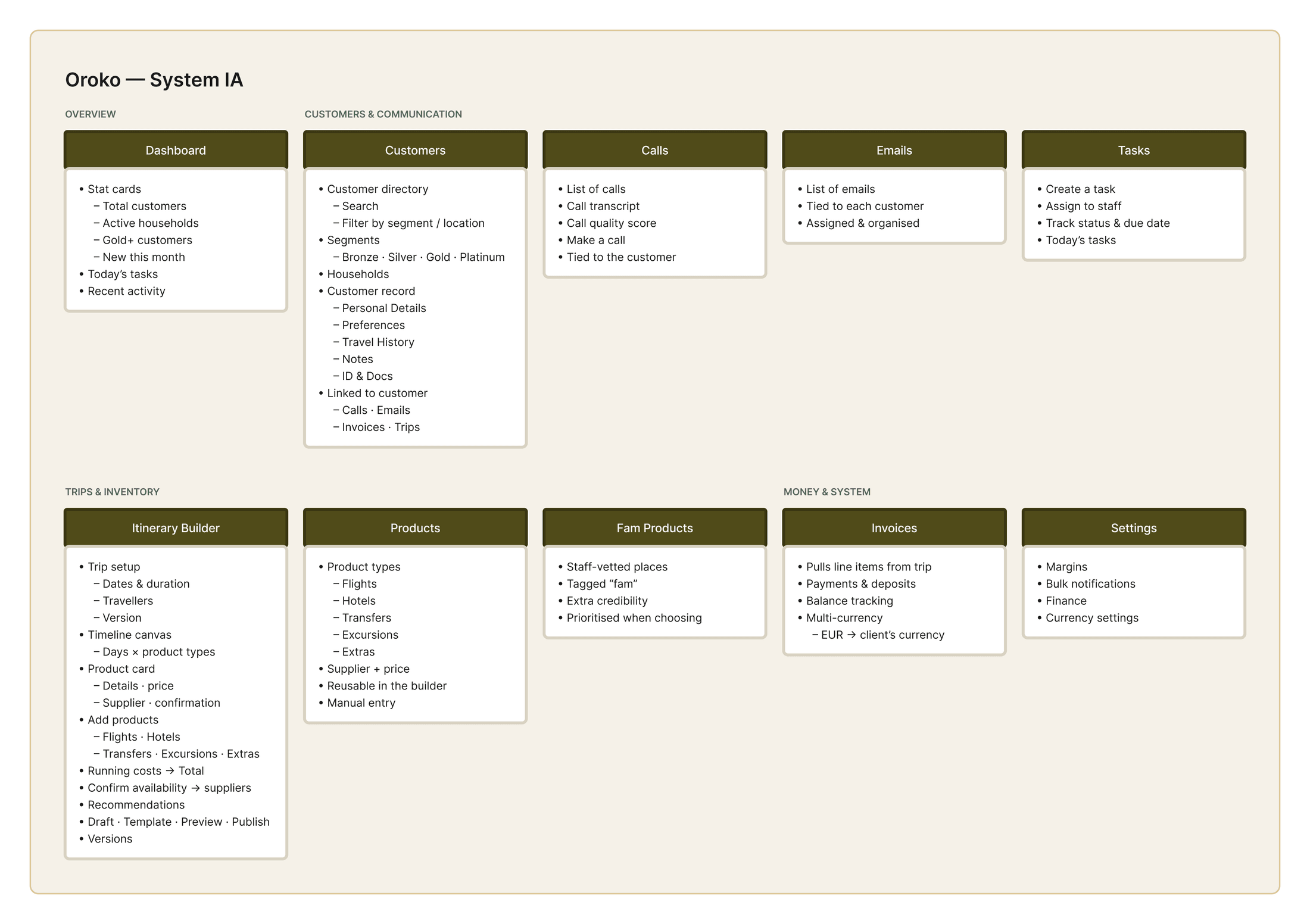
The system is built from separate modules — the real work was in how they connect.
Each module stands on its own — customers, the itinerary builder, calls, emails, invoices, tasks, products. You can work in any of them directly: every email in one place, every invoice in another, every trip in a third.
But the same information also gathers inside each customer. Open a person and you get their preferences, travel history, household, notes and documents — plus their own calls, emails, invoices and trips. Open one of those trips and you drop straight into the builder for it.
So a designer works by module or by customer, whichever the moment needs — the same data, reachable from wherever they are.
05
User flows
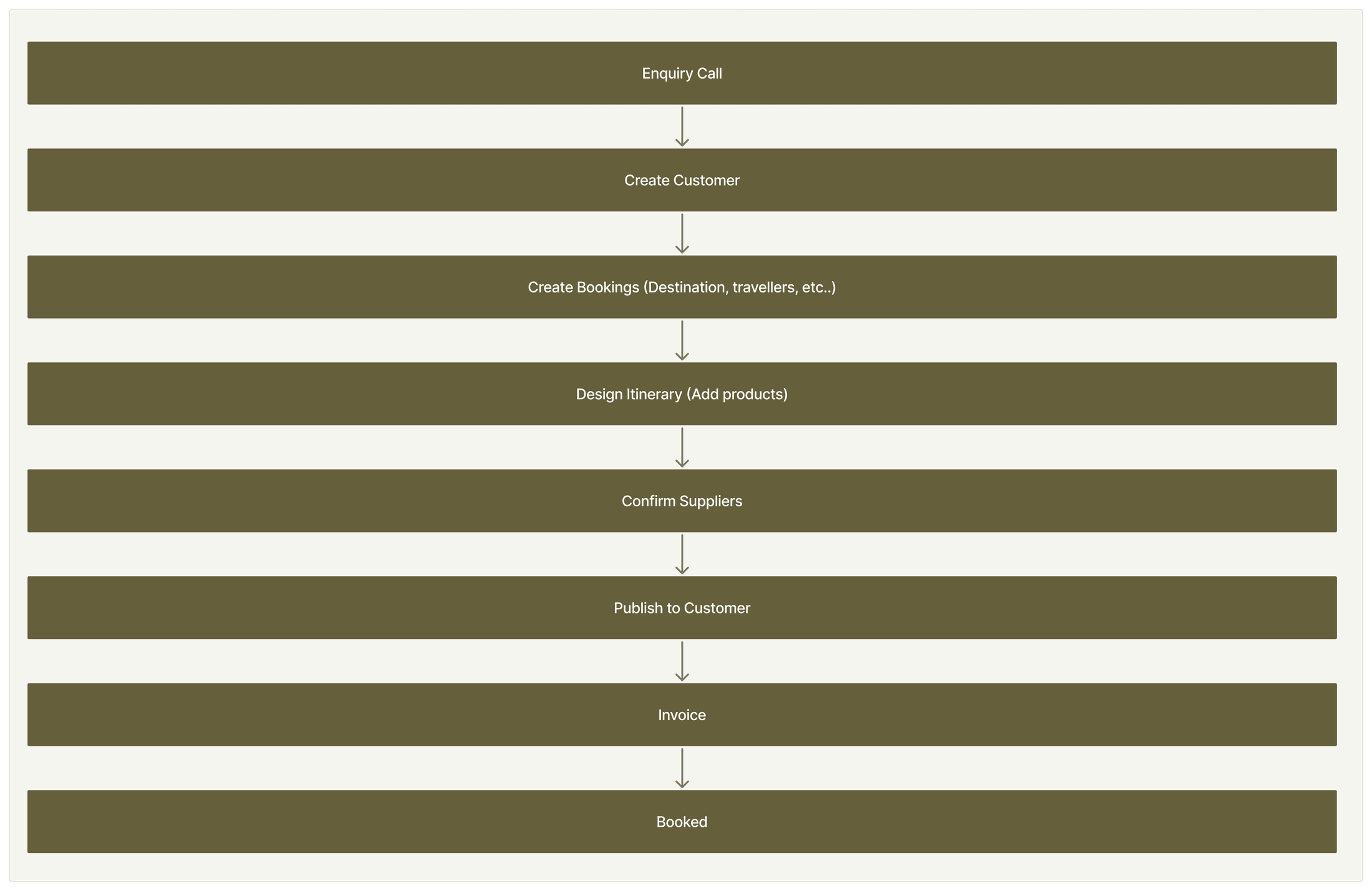
How a Travel Designer moves through the system — from a first enquiry to a booked trip.
It starts with an enquiry. A new customer becomes a record, and their trip hangs off it. From the customer you can see everything about them — past trips, preferences, every call and email — so you're never guessing what they want.
Then you open the trip and build it. You add products day by day — flights, hotels, transfers — group the travellers, and set the dates. When it's ready, you confirm with the suppliers in one go, and each one approves or comes back with an alternative.
Once it's agreed, invoicing pulls straight from the trip — nothing re-typed — and you publish. The customer gets a clean itinerary, and the version is saved. The whole path, from a cold enquiry to a booked trip, stays in one place.
06
Sitemap
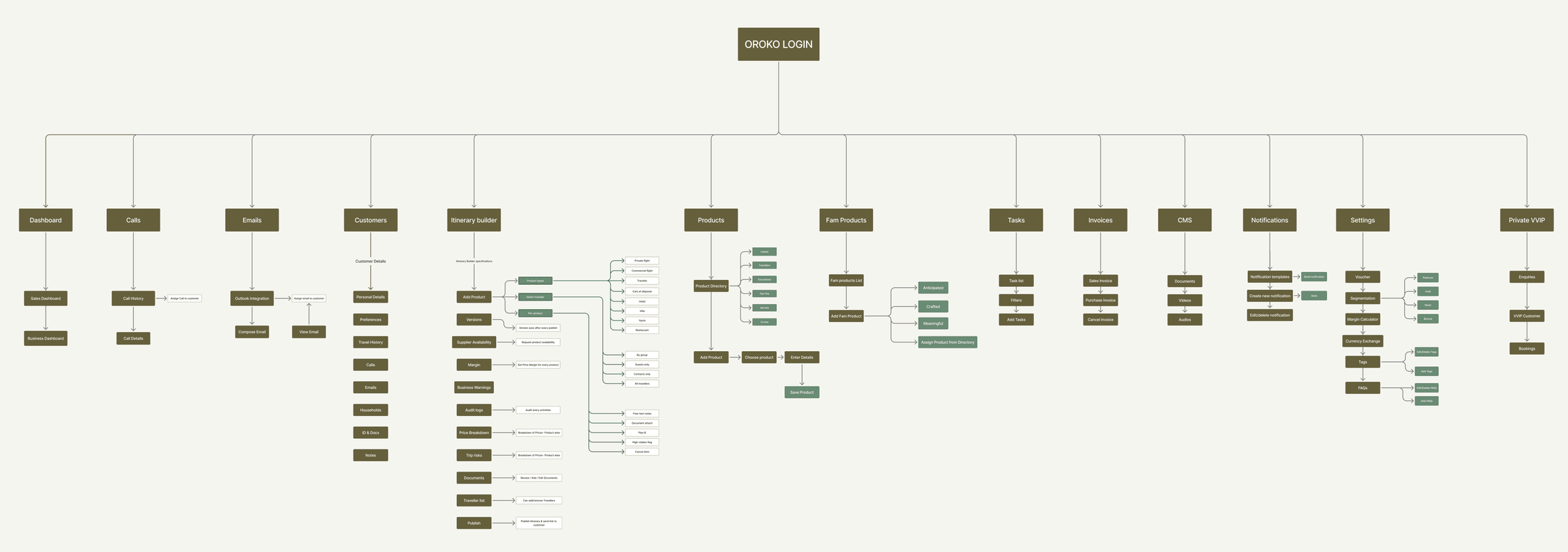
The flow is one path through the system. The map is the whole of it.
Where the user flow traces a single journey — enquiry to booked trip — the sitemap lays out everything the product can do: every module, and under each, the pages and functions it holds.
It's the view I kept coming back to while designing. For a system this connected, seeing the whole structure in one frame is what keeps it from becoming a pile of features — it stays something you can hold in your head.
07
Design System
One visual language runs across both products — a single palette and type system, so a booking card, an invoice and a code-named traveller all feel built by the same hand.
The product runs on two brand colours — olive for primary, sage for the quieter work — over a soft off-white. Three signal colours do the rest: orange for pending, green for confirmed, red for anything that needs attention. Restrained on purpose: in a tool this dense, colour has to mean something.
── Colour
Brand & surface
Signals
── Typography
Just two typefaces, each with one job — a serif with presence, and a grotesk that knows when to step back.
Cormorant
This one carries the premium. A high-contrast serif with real presence — it makes a trip feel less like a booking and more like an invitation.
Cannes Journey
Hanken Grotesk
Chosen to pair with it, not compete. A clean, level grotesk that quietly carries the dense work — tables, itineraries, fine print — and lets Cormorant do the talking.
Every booking, every call, in one place.
08
The system, up close
Seven parts of the build worth slowing down on.
The itinerary builder
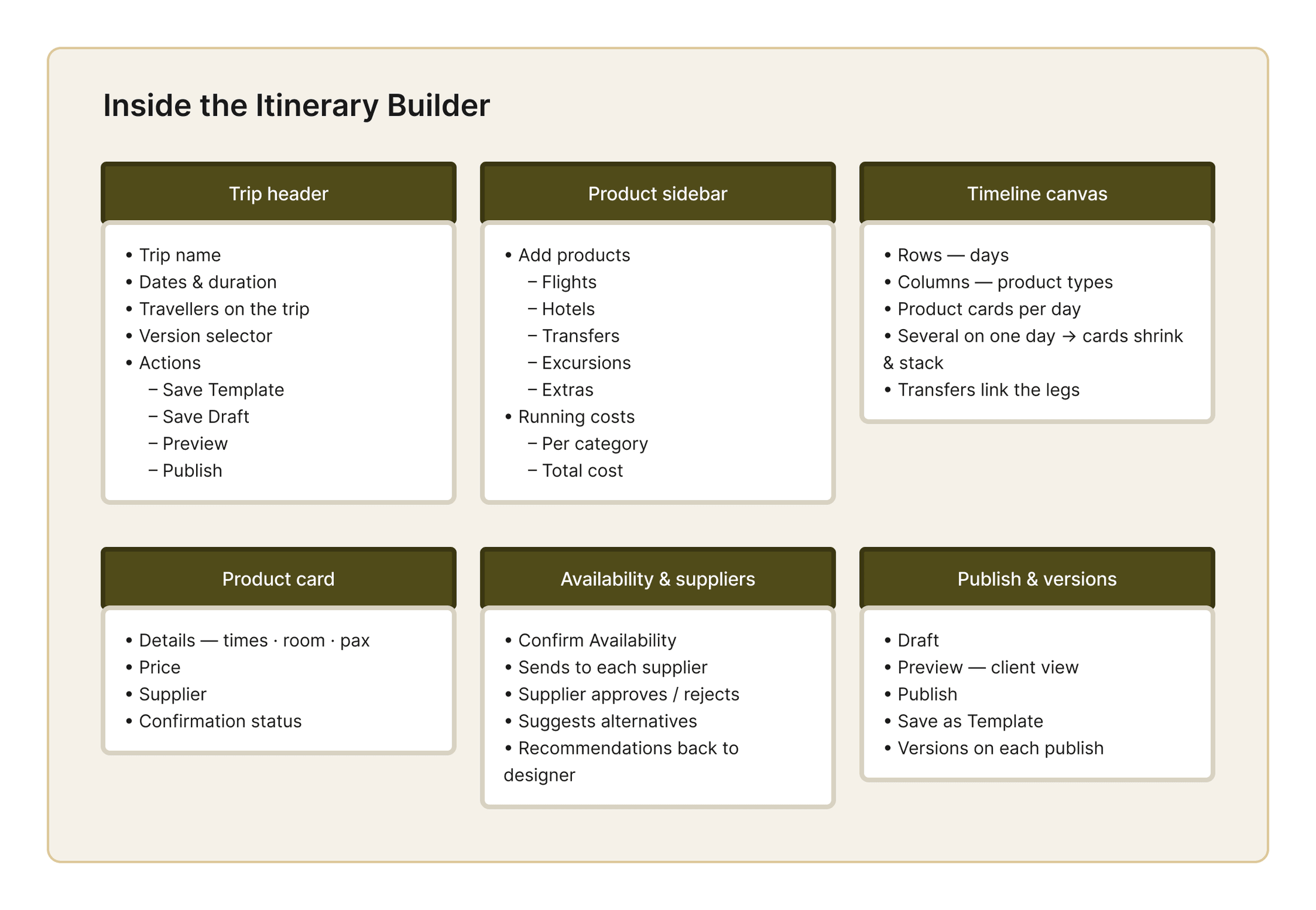
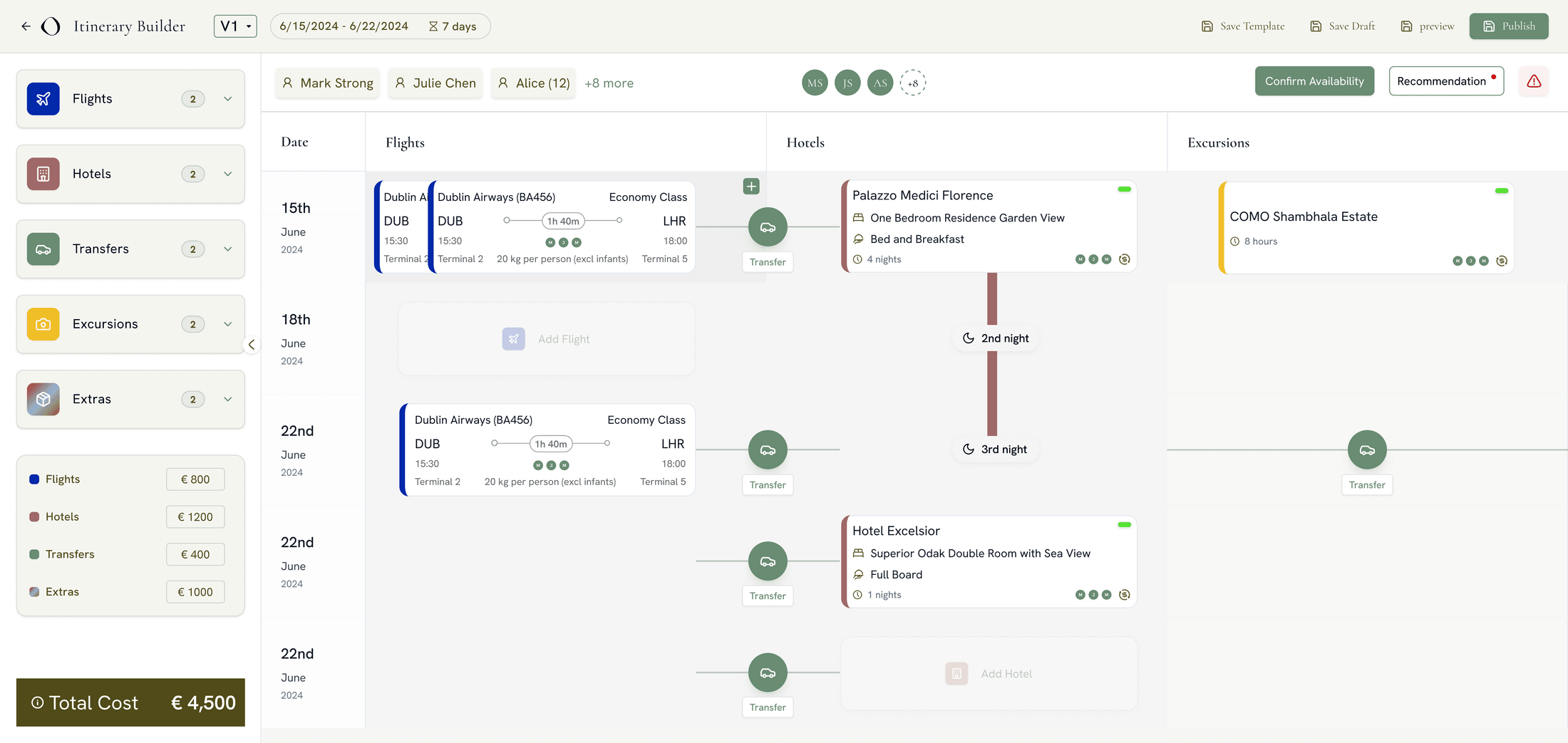
A luxury trip uses a fixed set of products — flights, hotels, transfers, excursions, extras — so each becomes a column, with the days running down the side. The whole trip sits on one screen; a designer takes in three weeks without a click. Finished trips save as templates and get reused, and every published version of an itinerary is kept — V1, V2, and on — so the team can always see exactly what was agreed at each stage.
One day, many travellers
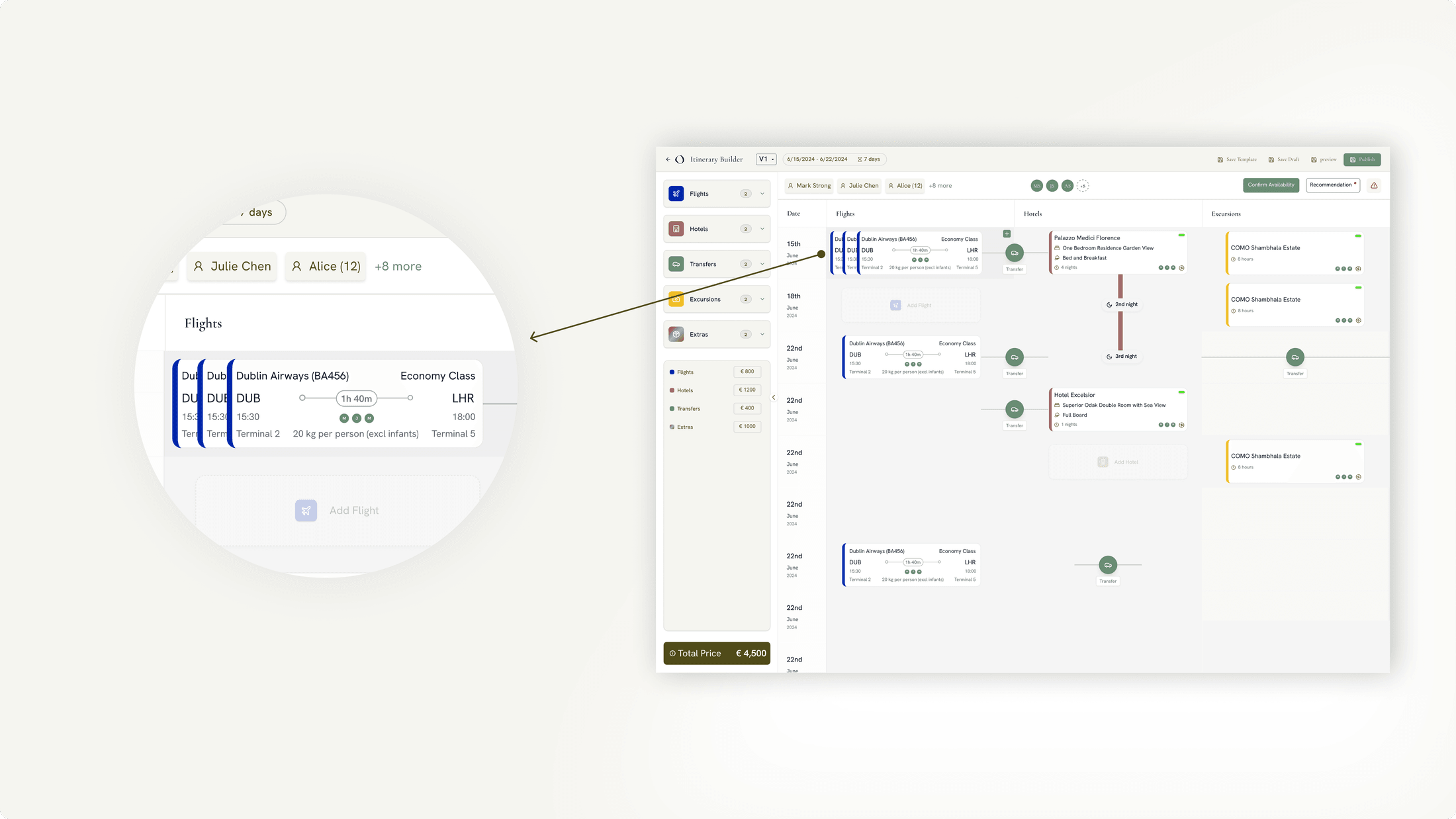
The hardest problem in the build. A group of ten might fly out of four different cities on the same morning, and sleep across two hotels on the same night. All of that has to sit on a single day without turning into noise. The answer was to let a product repeat: each booking is its own card, and when several land on the same day, the cards shrink and overlap — stacked, still readable, each a real booking underneath. A Travel Designer doesn't count line items; they glance at the stack and feel how full the day is.
The customer module
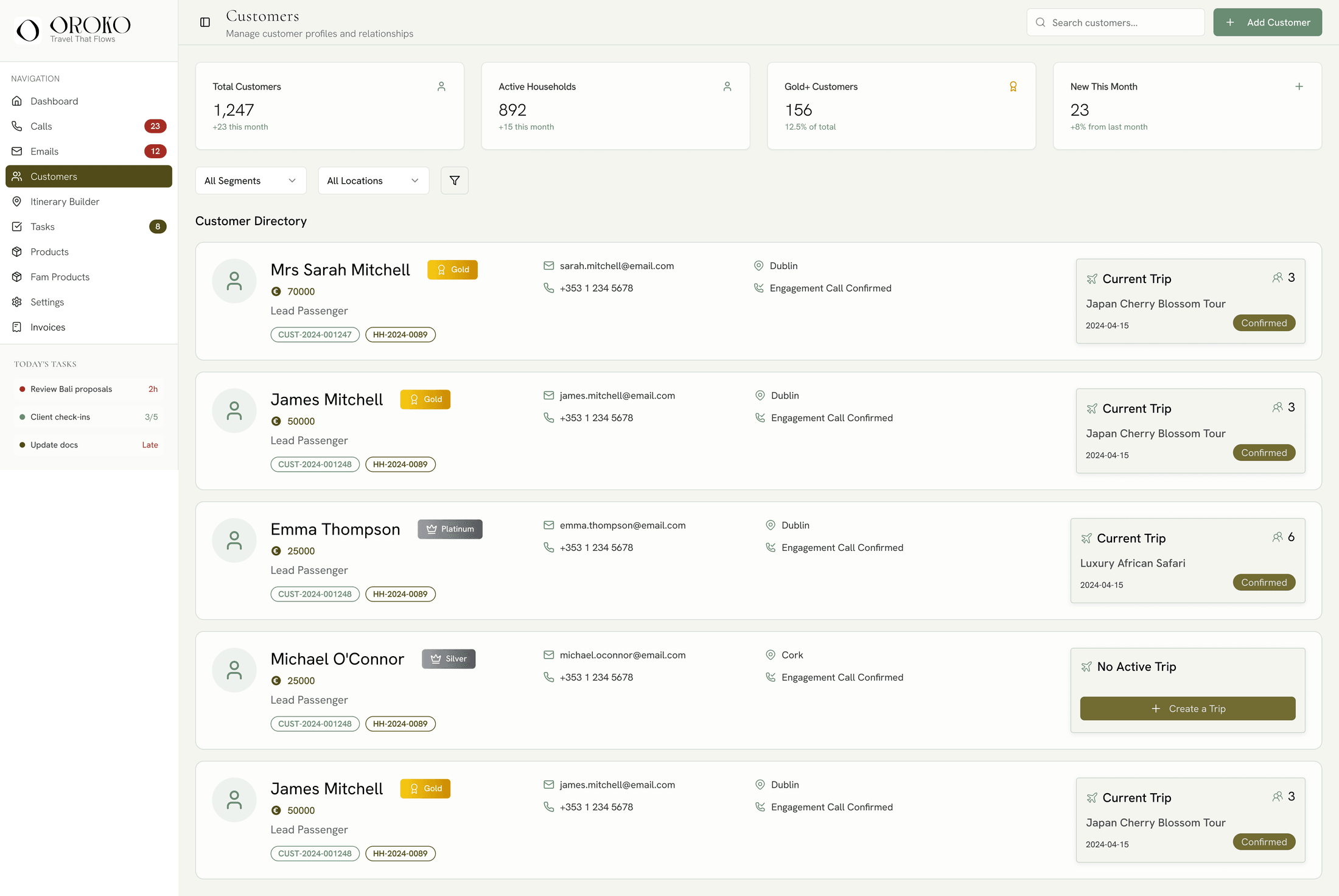
Every customer with their calls, emails, trips and history in one place — the consolidation idea made literal. Two quieter features sit underneath it. Households link the people who travel together, so booking for a repeat client pre-fills their party instead of starting blank — nobody re-types a passport number they entered last summer. And loyalty tiers sort customers by how much they've travelled with Oroko, so a Travel Designer can see at a glance who they're talking to.
The product library
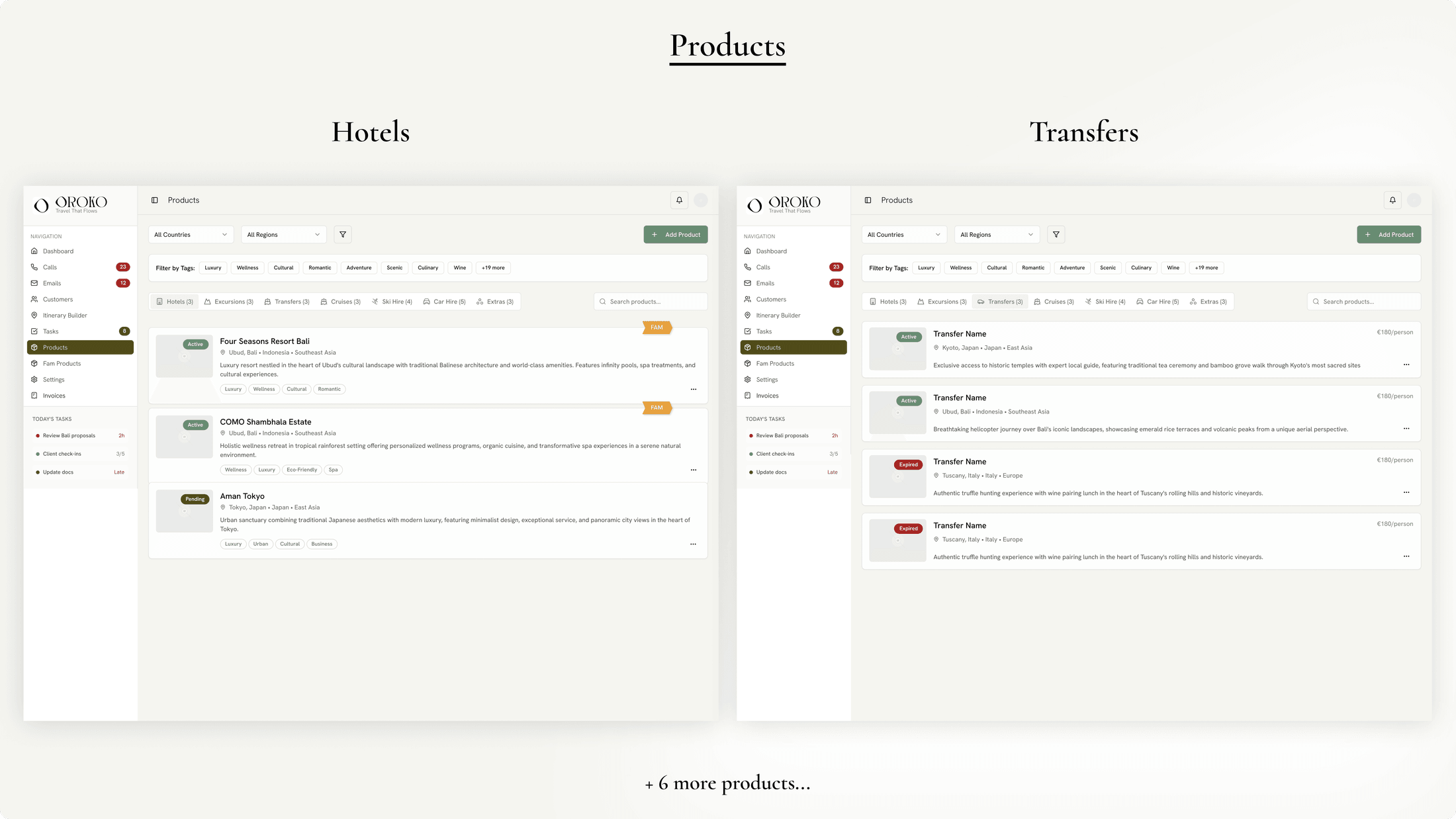
Everything the agency books — hotels, flights, transfers, excursions, extras — lives in one library, split into tabs by type. A product is added once, with all its detail, and stays in the system. Building a trip, a designer pulls it straight from the library and drops it onto a day — a quick-add, not a re-type. The catalogue does the remembering, so no one rebuilds the same hotel twice.
Fam products
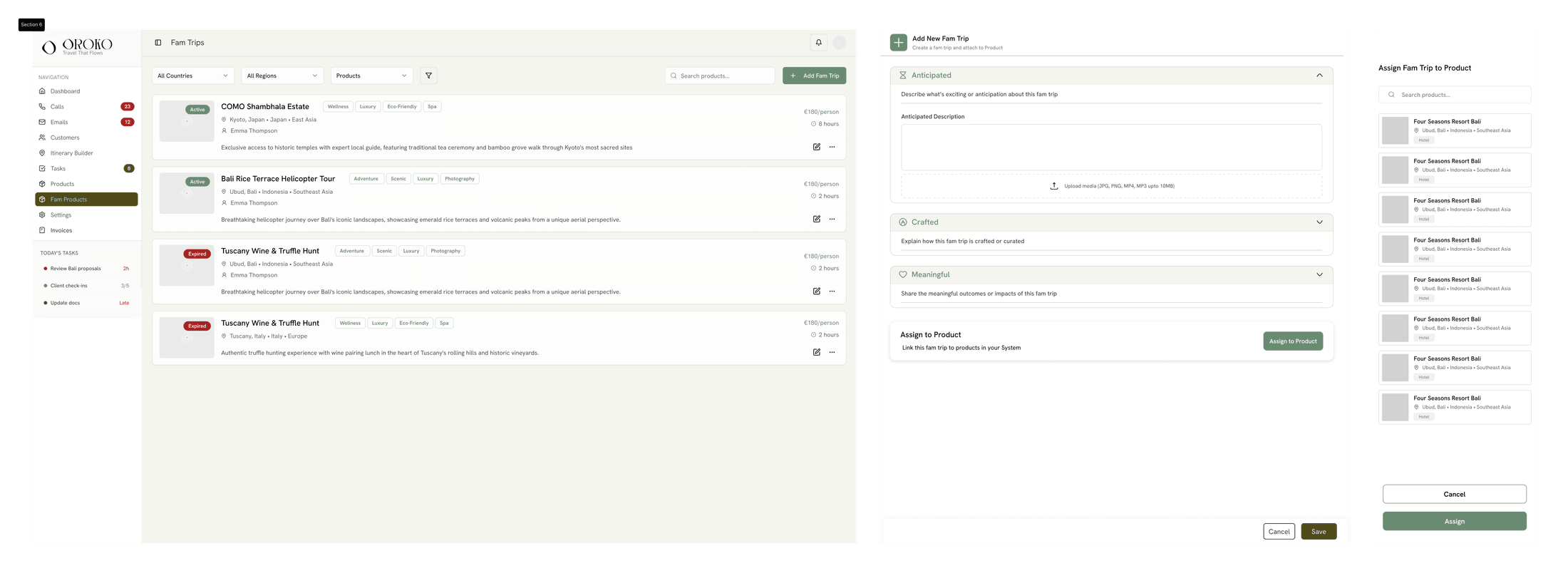
A small idea the team loved. When a staff member stays somewhere themselves and rates it, they can add it to the system and mark it a fam product — a place vouched for from the inside. When a Travel Designer is choosing where to send a client, those carry extra weight. It turns the team's own travel into a quiet, trusted layer of inventory.
Confirming with suppliers
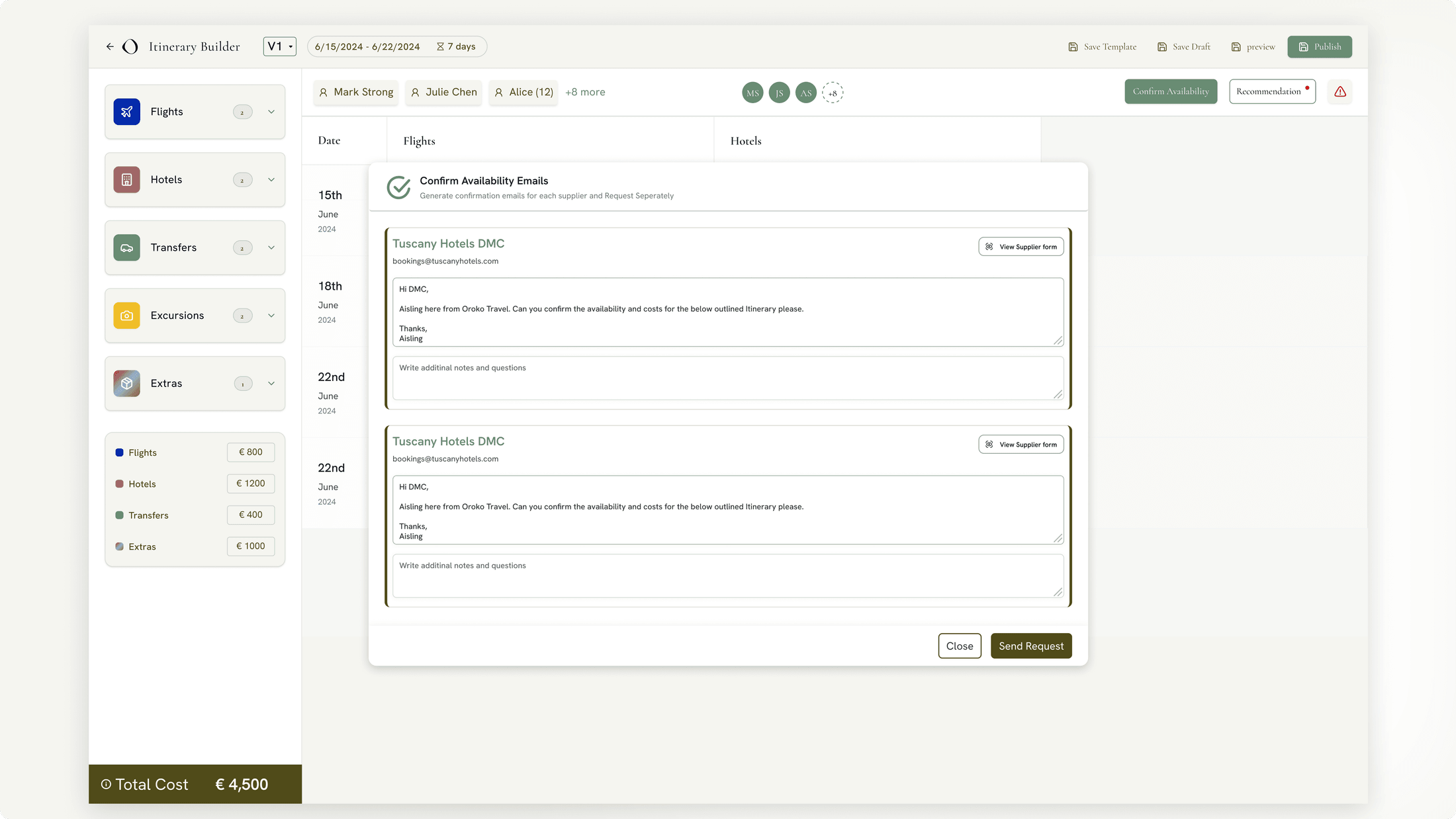
Once a trip is built, the designer hits confirm and sees every product and its supplier in one list. Each supplier gets an email with a link to approve or reject what's been asked of them — and to suggest an alternative if they can't do it. Those suggestions come back into the trip as recommendations, so the back-and-forth that used to live in a hundred emails now happens in one place.
Invoicing
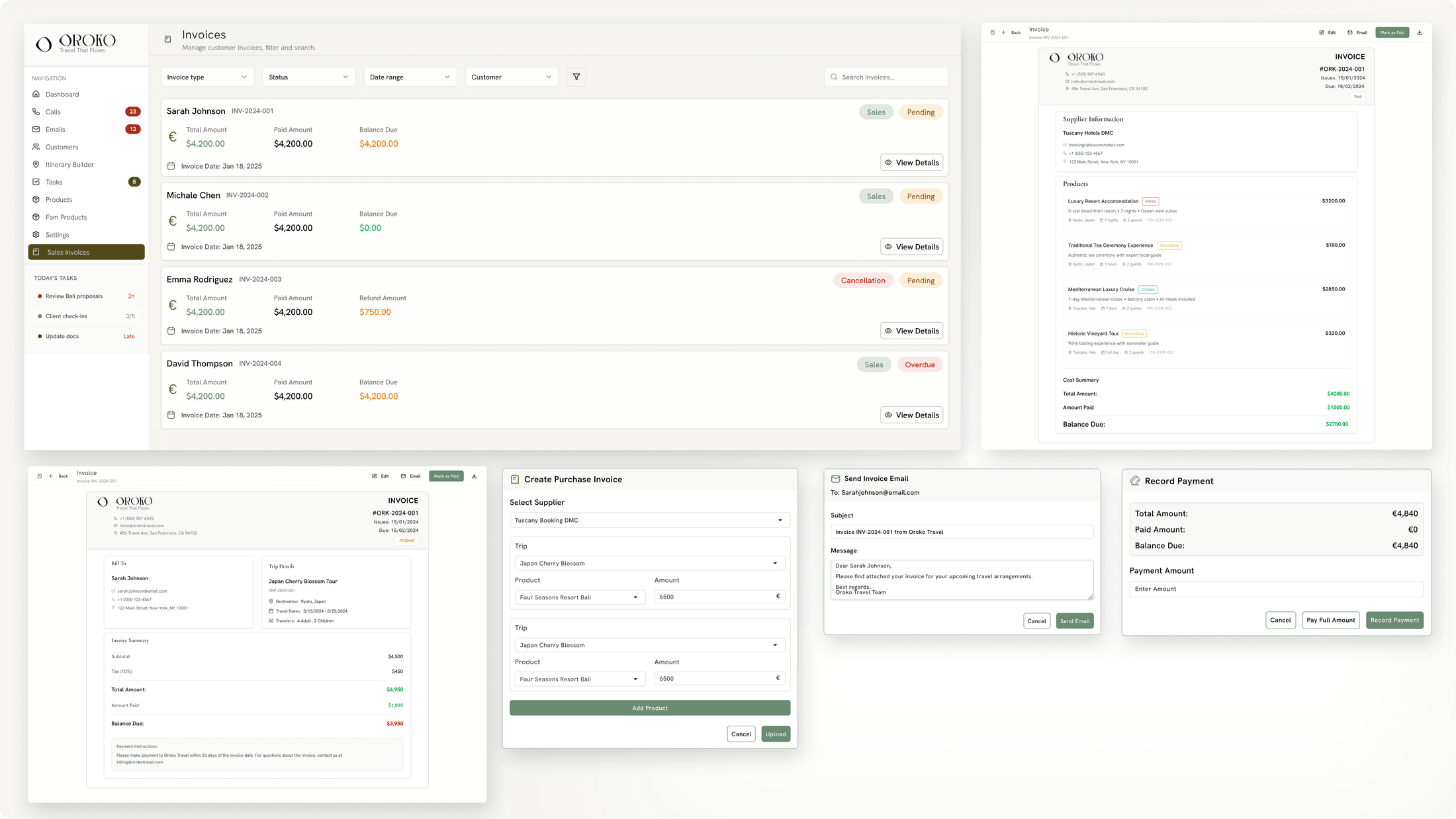
The money side stays attached to the trip. Sales and purchase invoices, deposits and payments are all logged against it, each with a clear status — pending, paid, overdue — and prices show in the customer's currency, so a client in New York sees dollars where the trip is priced in euro.
09
Oroko Private
Oroko Aura organises a trip. Oroko Private governs one.
A while after the first system went live, Oroko came back — this time for their most high-profile clients. That work runs in its own portal, Oroko Private, open only to the few people cleared for it. It has its own three tabs — VVIP Customers, Enquiries and Bookings — a sealed space for the trips where the traveller's name is the most sensitive thing about the booking.
The problem was a different shape. Aura was about consolidation — putting the whole operation in one place. Private is about discretion and control. A principal's trip still needs real hotels, flights, drivers and dinners booked with real suppliers — but no supplier, and no one glancing at a screen, should be able to work out who is actually travelling.
So identity comes off the trip. Every traveller and every group becomes a codename, and the trip carries a neutral title. Real names live behind access, shown only to the few who need them. Everyone else builds the trip without ever knowing whose it is.
10
One trip, four ways to read it
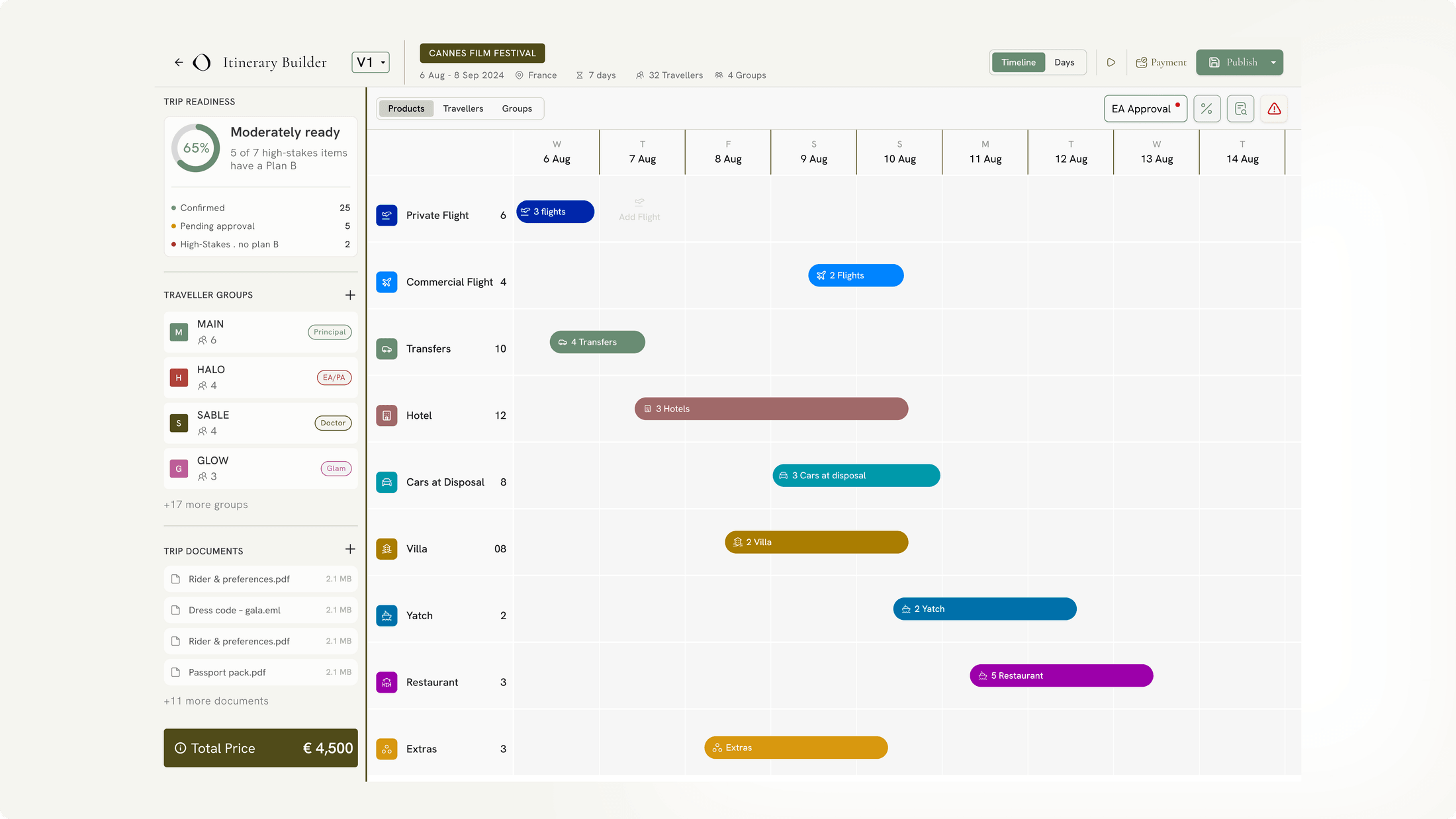
A private trip carries a large party across several groups, so one view isn't enough. The builder sorts the same trip four ways.
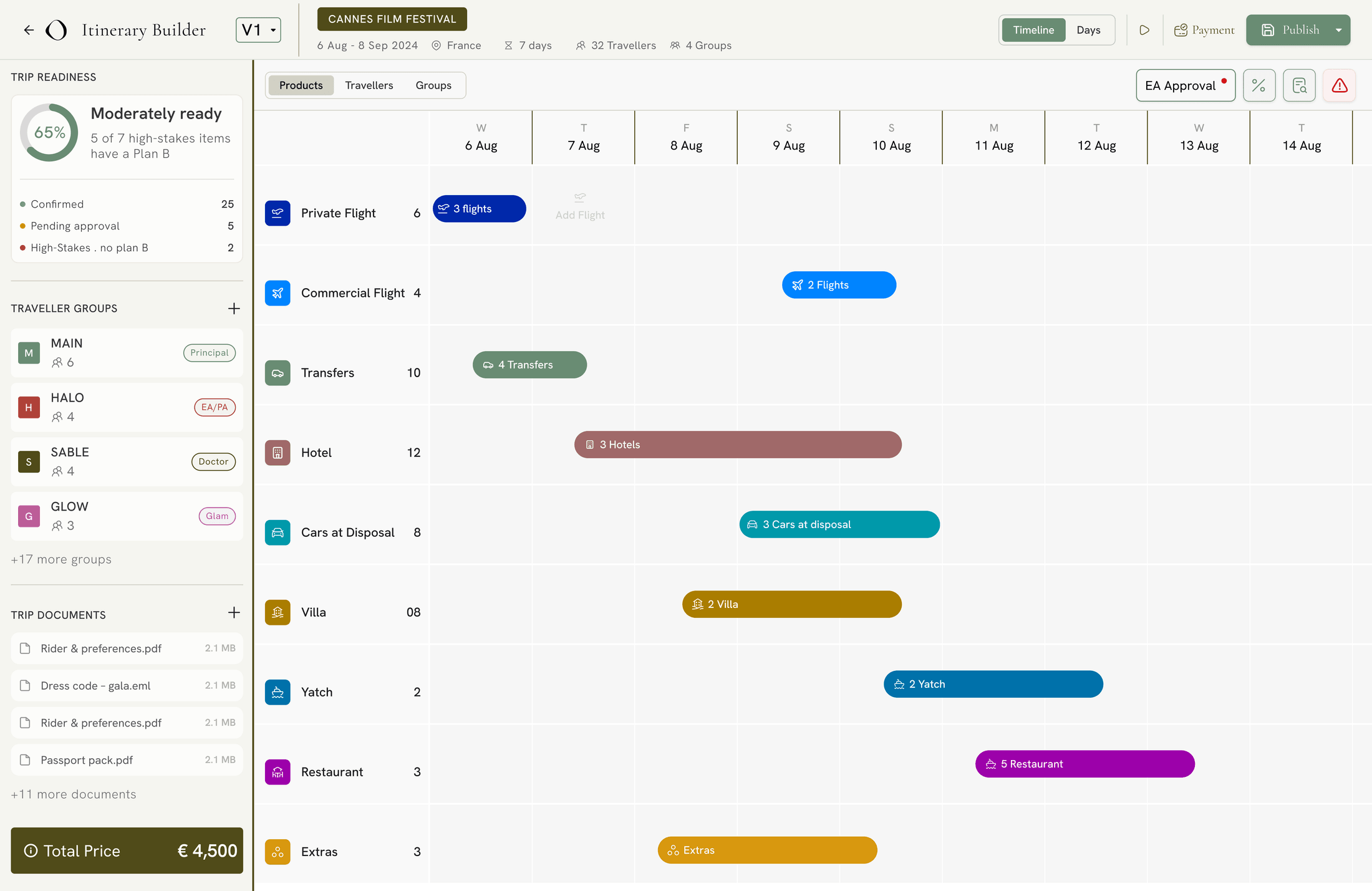
Product · Timeline
Product types down one side, days across the top. The whole trip on a single grid — the fastest way to read what's booked.
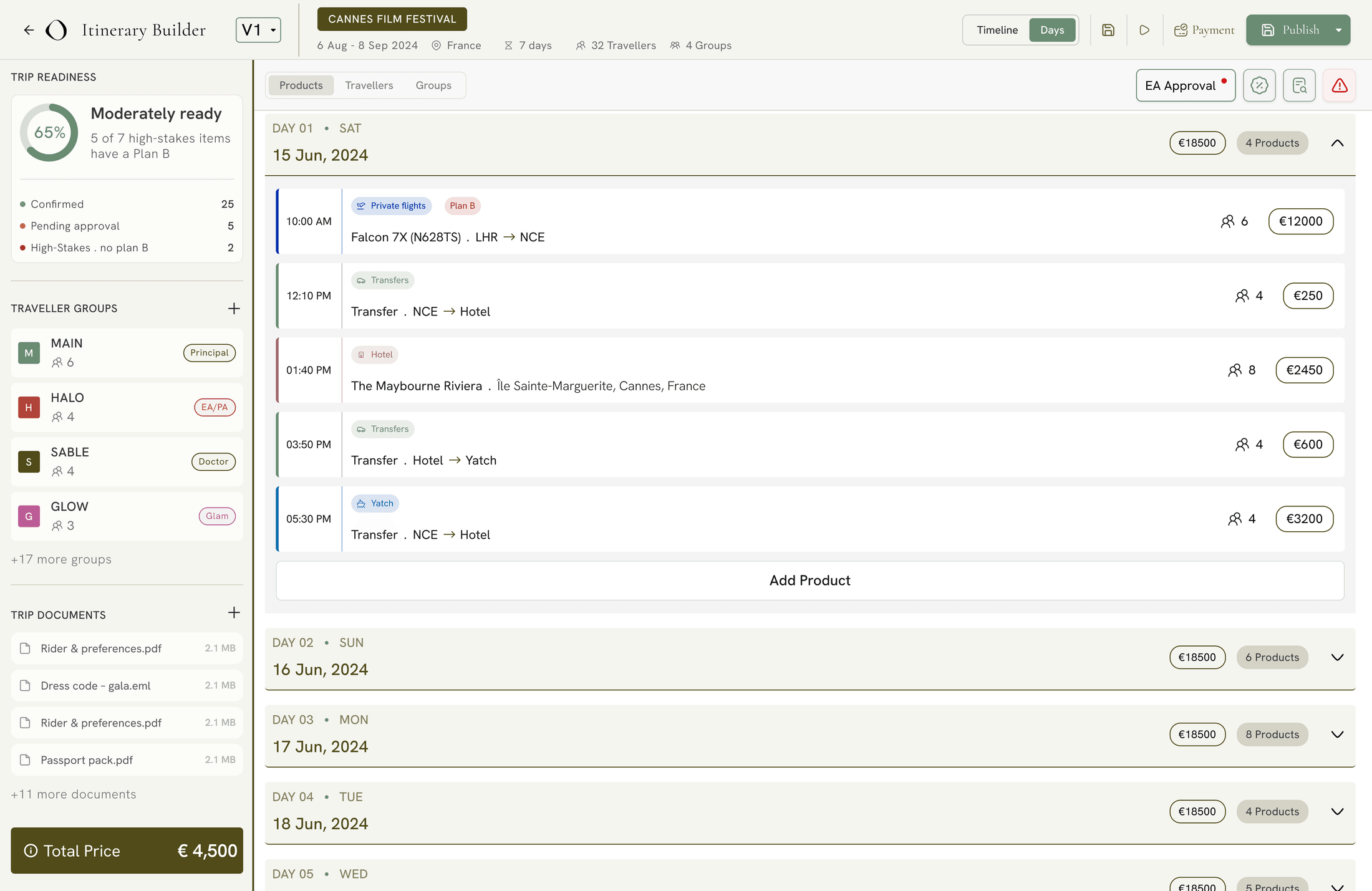
Product · Day
The same products, stacked a day at a time. Day one holds five things, day two holds two — the trip as a run of days.
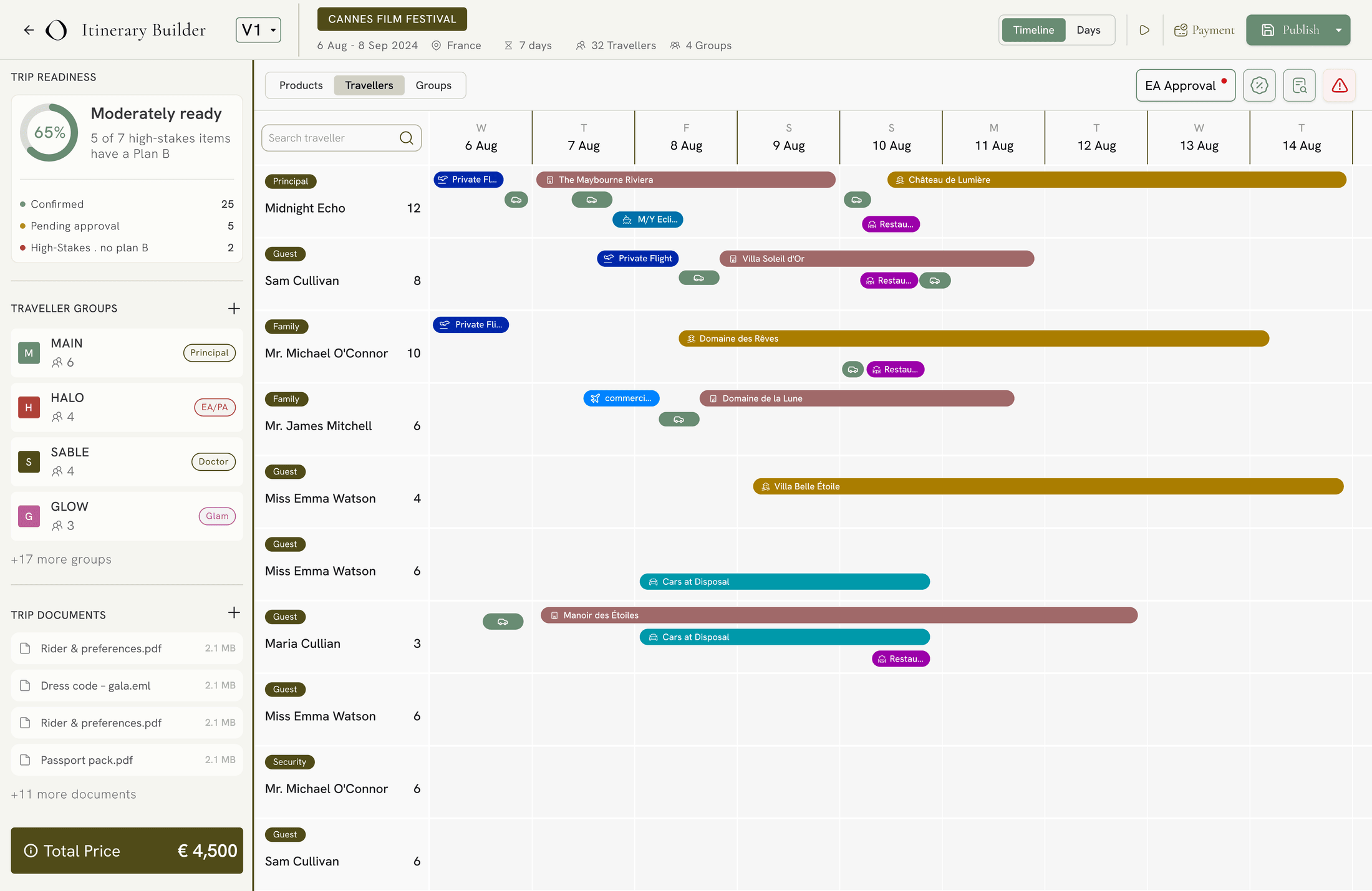
Travellers
Rows become people. When the party runs large, sort by traveller to see exactly where each person is.
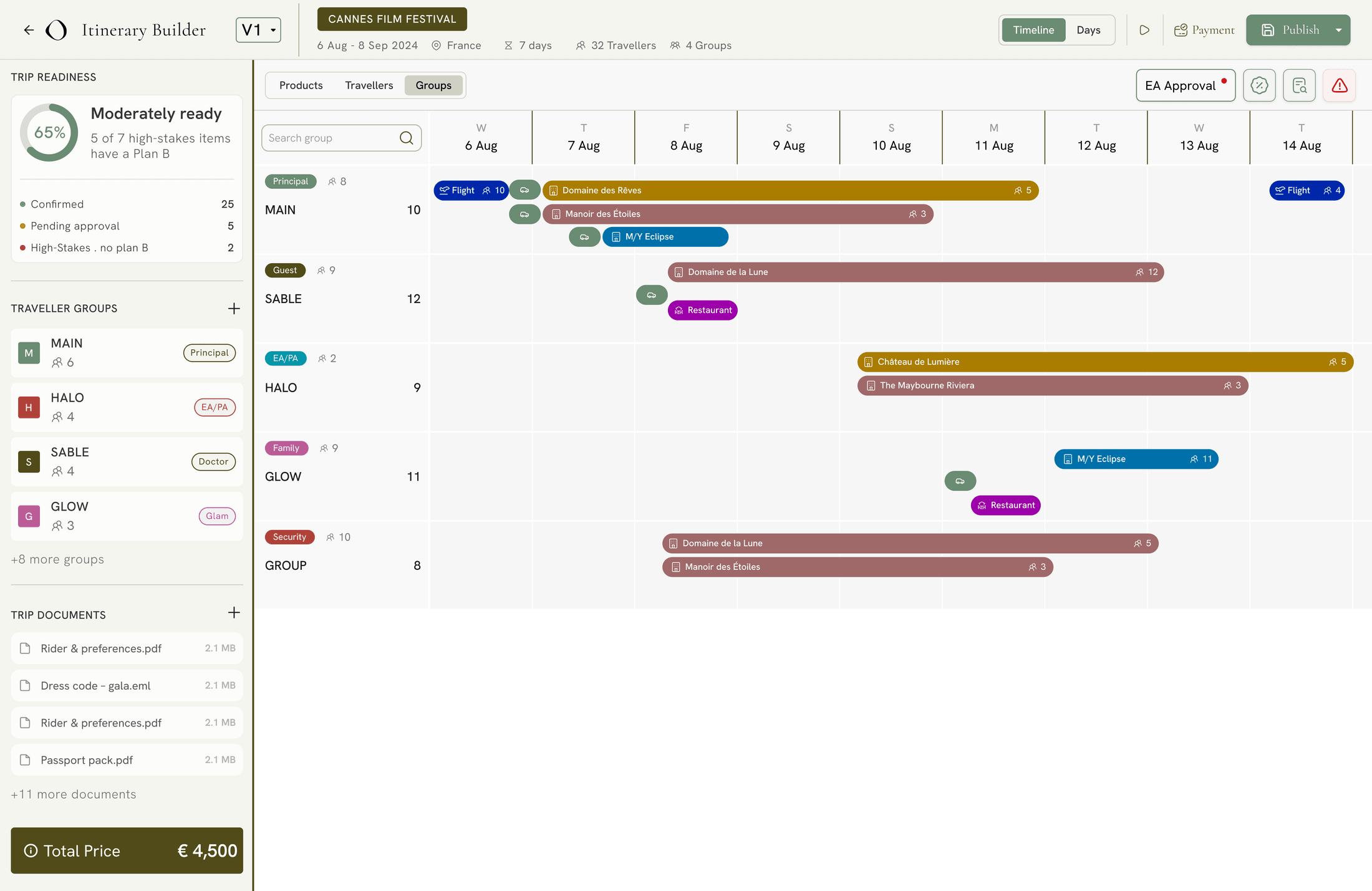
Group
Rows become groups. Build sub-groups, assign travellers, and read the trip one unit at a time.
11
Inside Oroko Private
Four more things that separate governing a trip from organising one.
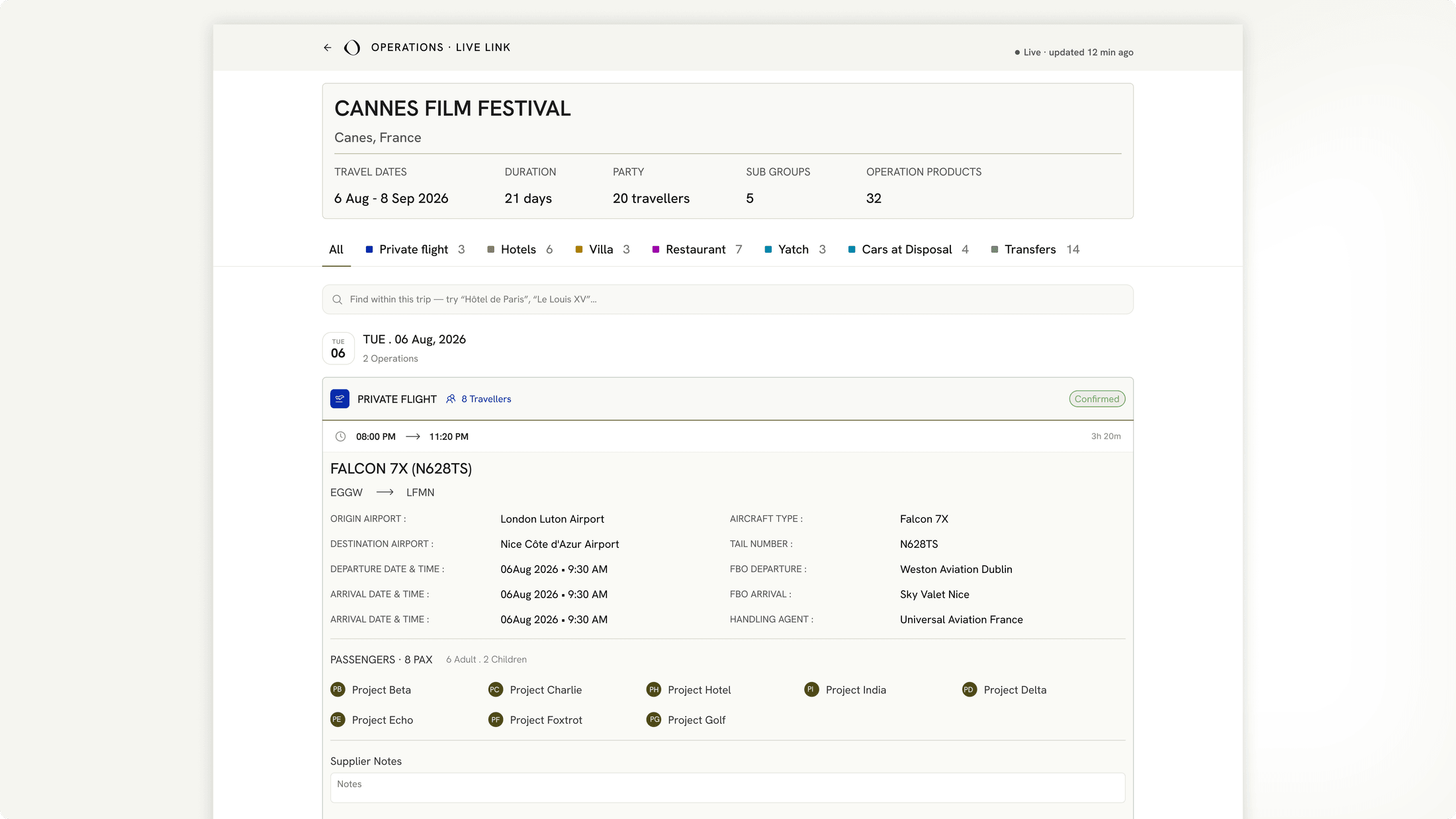
Discretion by default
Everyone on the trip is a codename — principal, family, security, glam — and that's all a supplier ever sees. Each supplier gets a live link to only their piece of the trip: code-named throughout, prices and margins stripped, phone and tail numbers masked. It refreshes on its own, logs every view, can be revoked at any time, and carries one rule — don't contact the guest; reply to the email if something changes.
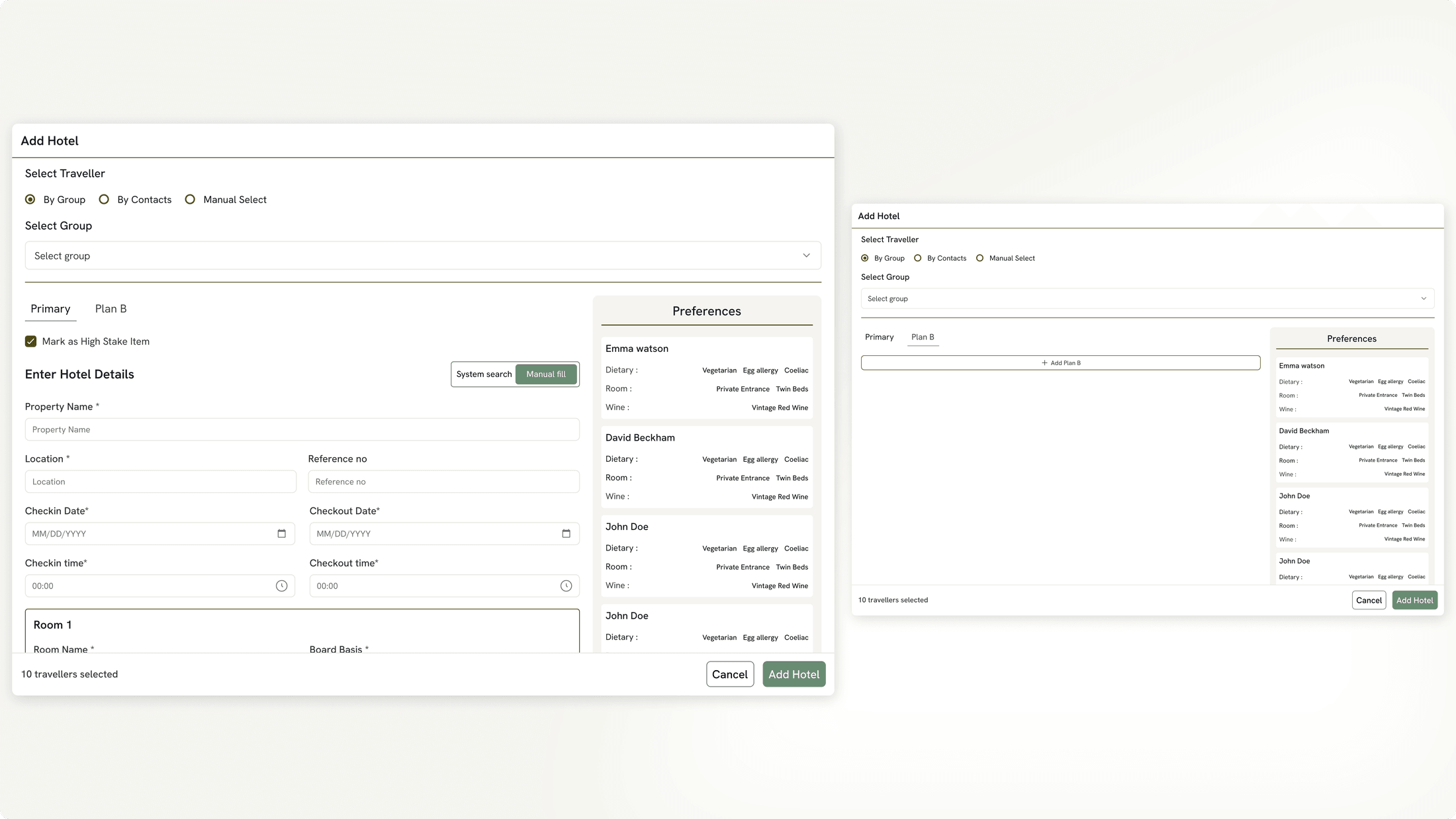
Built for high stakes
At this level, a villa that cancels the night before is a real problem. So any item can be flagged high-stakes and given a Plan B — a second option, fully booked and waiting. The trip carries a readiness score that counts how many of the risky pieces have a backup, so a planner reads the trip's exposure at a glance instead of holding it in their head. And the backup isn't passive — if the primary falls through, one tap on Activate Plan B swaps it in, and the Plan B becomes the booking.
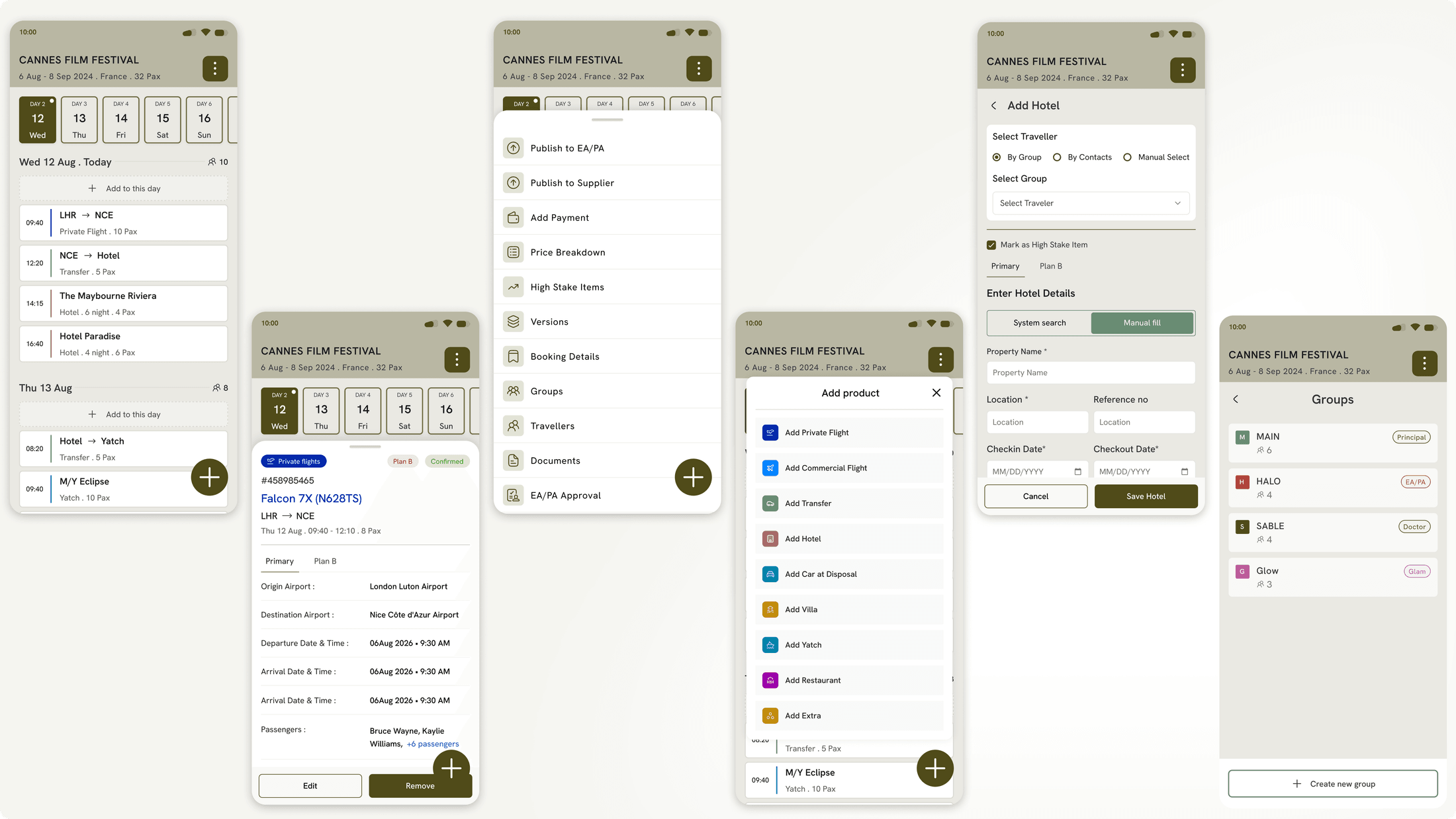
Edit anywhere
Emergencies don't wait for a desk. The builder has a full mobile view, so a Travel Designer can move a car or a dinner from a phone when a plan changes mid-trip — the same trip, the same source of truth, edited on the move.
The client's side
A principal usually has an EA or PA who runs their life, so they get the whole trip in an app — read-only and live. They can't edit it, but they hold one lever: when a price changes after the trip is published, it comes to their phone to approve or reject, and their answer is written straight into the record. Money can't move quietly.
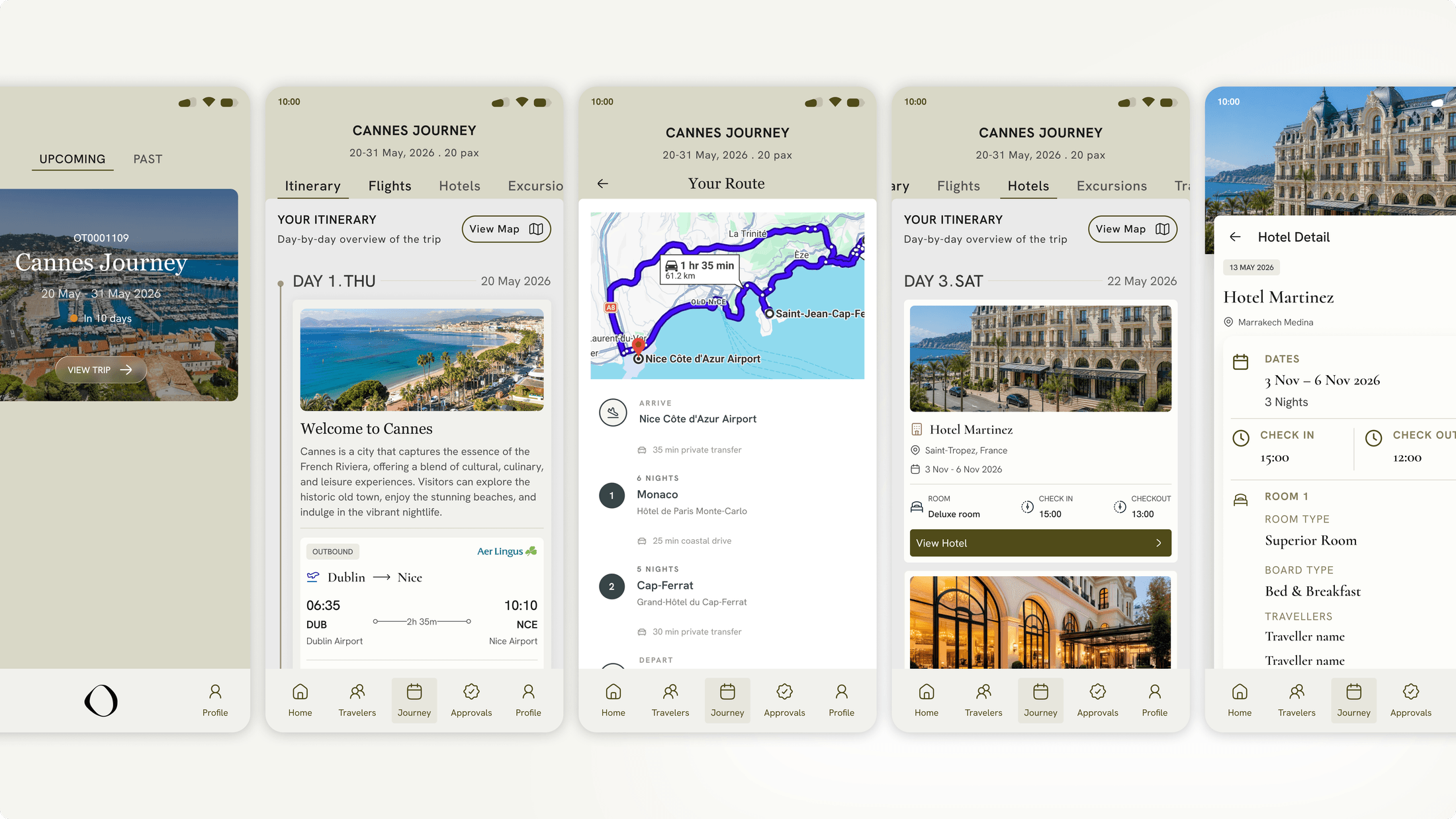
Itinerary
The whole trip, live on their phone — the day-by-day plan, and the detail behind any product.
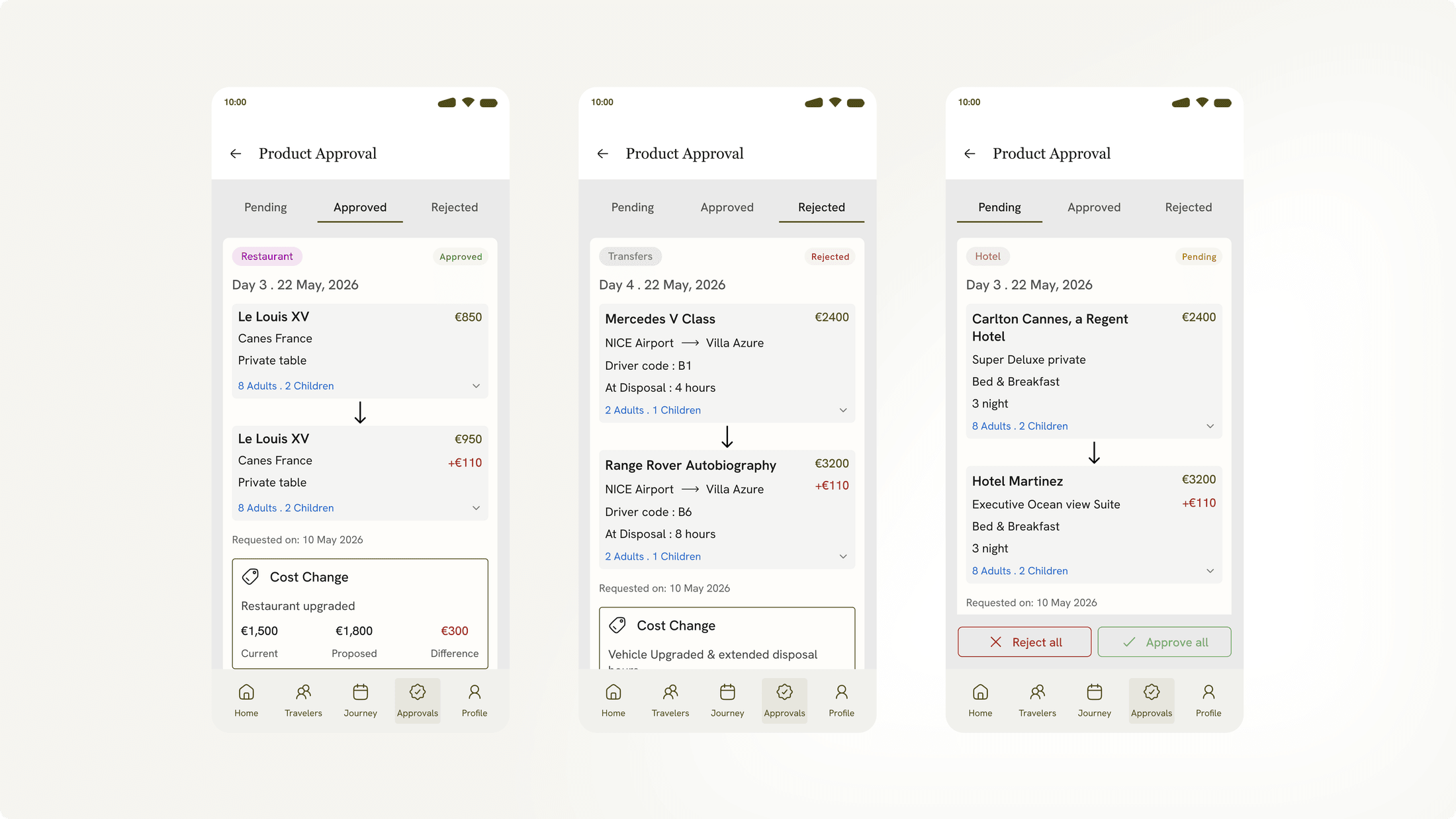
EA/PA approval
A price moves after publish and it lands here as Pending; one tap approves or rejects it, and the answer is written into the record.
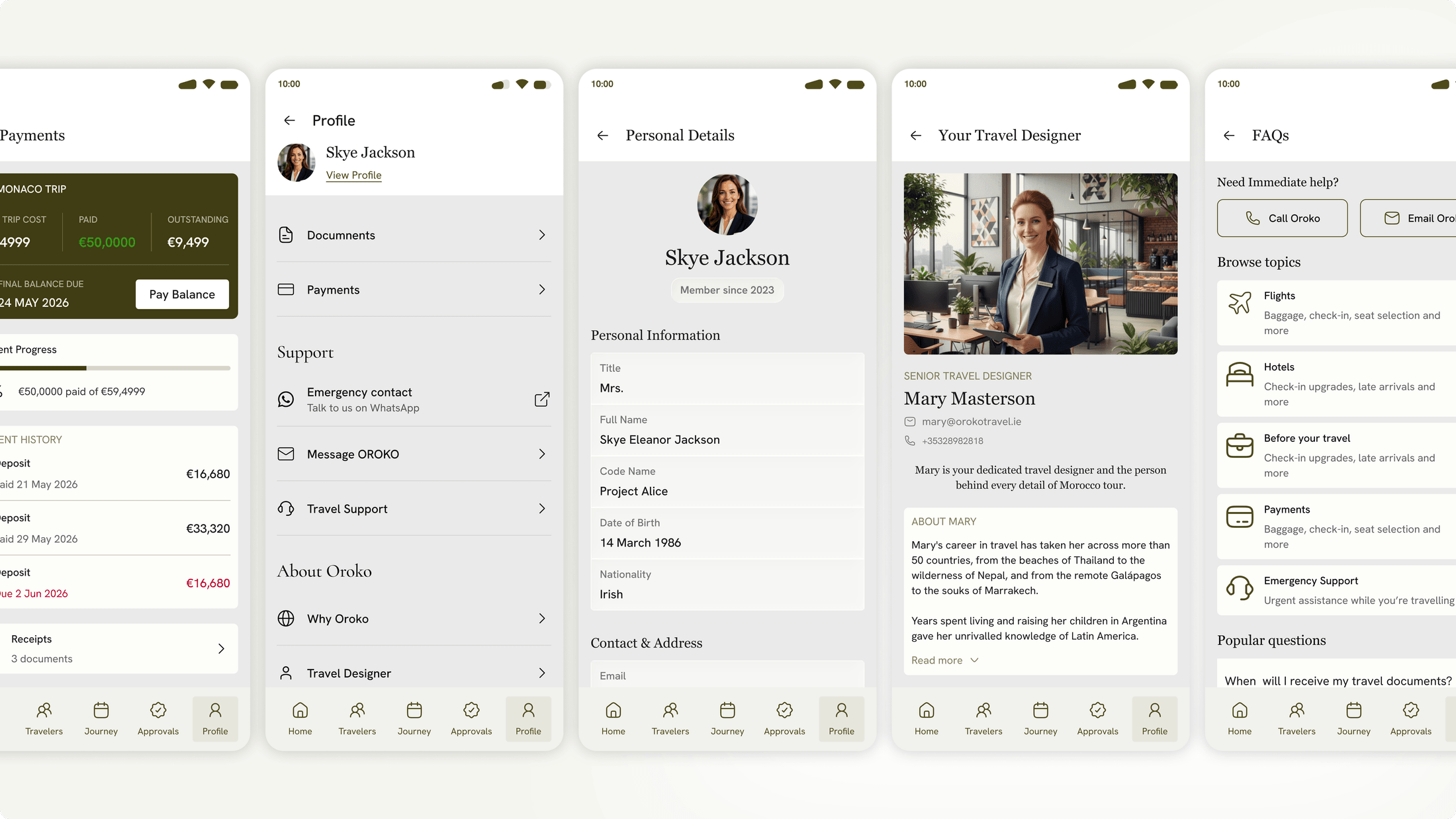
Profile
The party in one place — profiles, documents and travellers, all read-only.
12
What it changed
Oroko Aura runs the agency now, with real trips booked through it. The biggest shift is that the team stopped leaving the tool. The customer, the trip, the suppliers and the invoice all live in one place, so nobody's rebuilding a booking out of four tabs and an email thread.
The day-to-day got quicker in small ways that add up. Getting hold of a supplier or a customer takes seconds, because the contact and the whole history of the trip sit on the same screen. And a product can be changed at the last minute, with the update landing in the customer's own app straight away — that used to mean a phone call and a fresh document.
Oroko Private, the second system, is in testing ahead of going out to their high-profile clients.
13
Reflection
Most of this was invisible work. None of it is flashy — it's a hundred small decisions about where a thing should live and who's allowed to see it. When those decisions are right, the software just feels obvious and nobody notices the design at all. That's the job.
I put the system up against the tools the industry already uses, and I think it holds: it's simpler to learn, it keeps the whole operation in one place, and the private module does something most of those tools don't attempt. If I started again, I'd get end users in front of the hardest screens sooner — the one-day-many-travellers problem would have shown itself weeks earlier. But the bet the whole thing was built on — structure over familiarity, one place over many — was the right one. It's the reason the team actually moved.