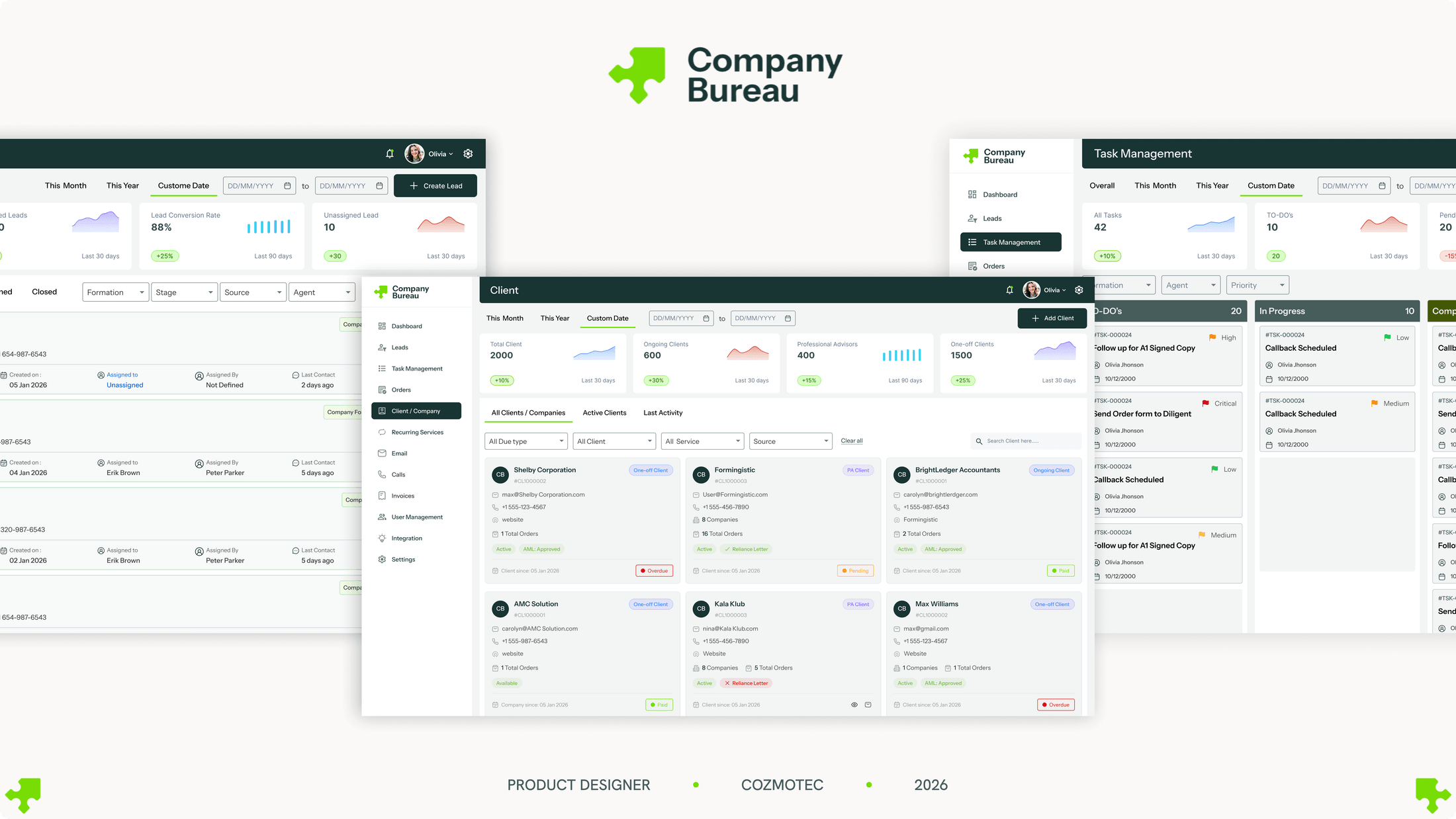
Company Bureau is Ireland's biggest company-formation and corporate-services firm — over 40,000 Irish & UK companies formed in nearly thirty years, then compliance looked after for life. The work was scattered across a stack of tools that didn't talk. I designed one system to pull every enquiry, order, formation, service and filing into a single place. I was the only designer on it, working in a constant loop with the PM — checking what was technically possible before I committed to it, so the design that came out could actually be built.
01
A stack of tools that didn't talk
Sage, Xero, Outlook, Diligent, AML HQ — every part of the job lived in a different tool, and none of them talked.
Company Bureau sets up Irish and UK companies, then looks after their compliance for life — annual returns, registered office, all the filings that keep a company legal. It's high-volume, deadline-heavy work, and it was spread across a whole stack of tools: Sage for client records, Xero for billing, Outlook for anything anyone said, Diligent for the filings, AML HQ for the checks — and spreadsheets patching the gaps in between.
And none of them talked to each other. So the same client got typed into one tool, then the next, then the next. Ask "where are we with this company?" and the answer was spread across five screens and someone's inbox — nothing followed a job the whole way through. It worked, but only because a few people held it all together in their heads. Which is slow, risky, and there's no real way to grow like that.
So this was never really about building a nicer CRM. It was about pulling everything into one place — one system where every enquiry, order, formation, service and filing lives together and stays in sync. And honestly, the hard part was the integration: getting a sprawling set of tools to behave like one.
02
Understanding the whole thing first
Before I designed anything, I wanted to really understand how this business runs.
We started with a basic scoping document, and from there I went deep — every function, every flow, and how the whole thing actually fits together. On a system this tangled, you can't design anything real until you properly understand the work.
The Service Manager runs this day to day, so a lot of it came from her. I got on calls and had her walk me through the full flow — every step, and every "okay, but if this happens, then that changes" edge case. And there were a lot of those: a bond if all the directors live outside the EEA, a lawyer's letter if there's a corporate shareholder, a trust that quietly triggers a whole extra filing with Revenue. We worked through them until the flow was finalised.
And it's not one team using this, either. A lead starts with sales; the formation itself runs through the formation team; and the ongoing compliance sits with the COSEC team — each picking up where the last left off. So the system had to work for all of them: hand a job cleanly from one desk to the next, and let anyone see where it's got to without having to ask around.
They also gave me access to their current system, Sage CRM, so I could see exactly how they work today and pull the real requirements from it — and that's what I leaned on to shape the information architecture. Seeing it up close showed me the daily grind, too: the same details typed into one tool, then copied into the next, then the next. That was the thing I most wanted to fix — not some missing feature, just all that friction.
So I wanted it to feel seamless, but I was careful about how. For each step I asked whether automating it actually helped. Some steps genuinely need a person — so instead of hiding those, the system just nudges you to do them and notes that you did, so nothing slips and you can always see where a job's got to.
03
One system, three groups
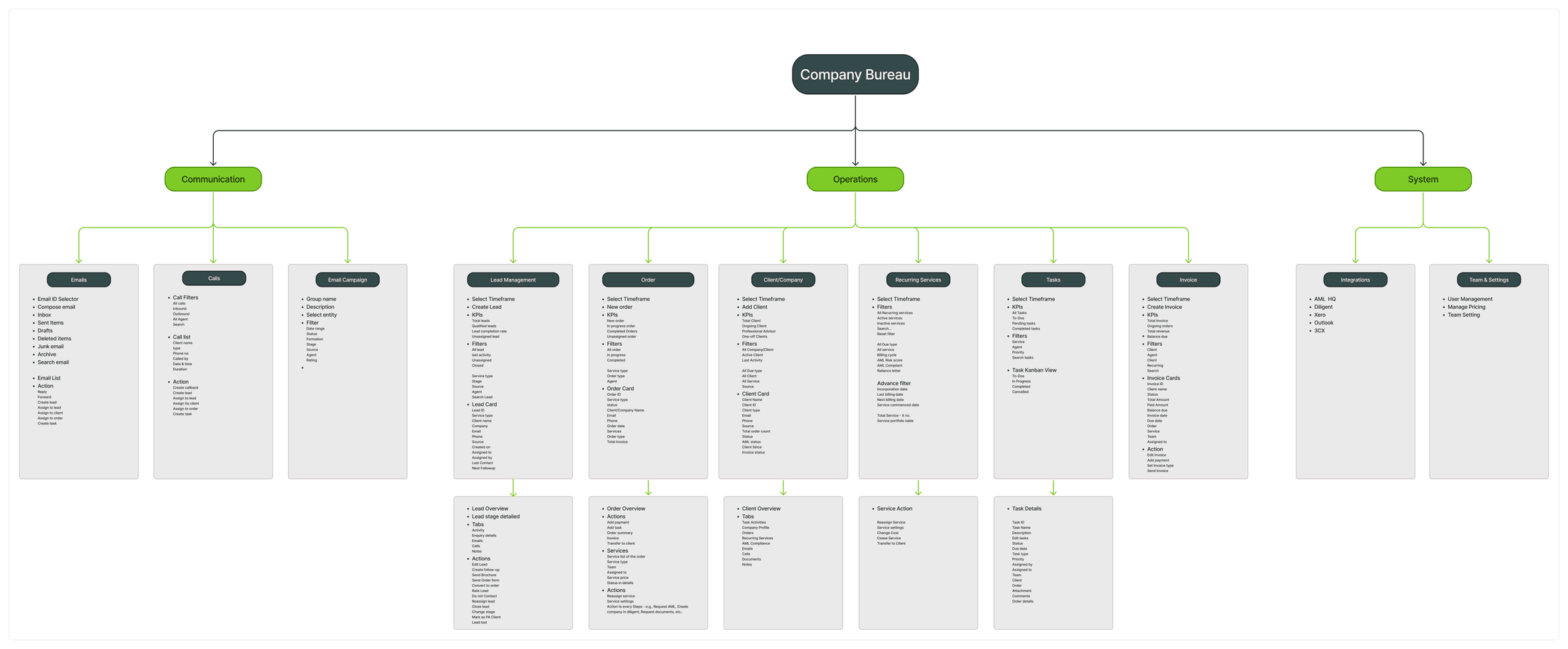
A dozen modules — the real work was making them behave like one system, not a sprawl.
So everything sorts into three groups. The operational core — leads, orders, clients and companies, recurring services, tasks and invoicing — is where the actual work happens. Communication keeps the emails, calls and campaigns together. And the system layer — integrations and settings — wires it out to the outside platforms and holds the config. Eleven modules, but grouped so you always know where you are.
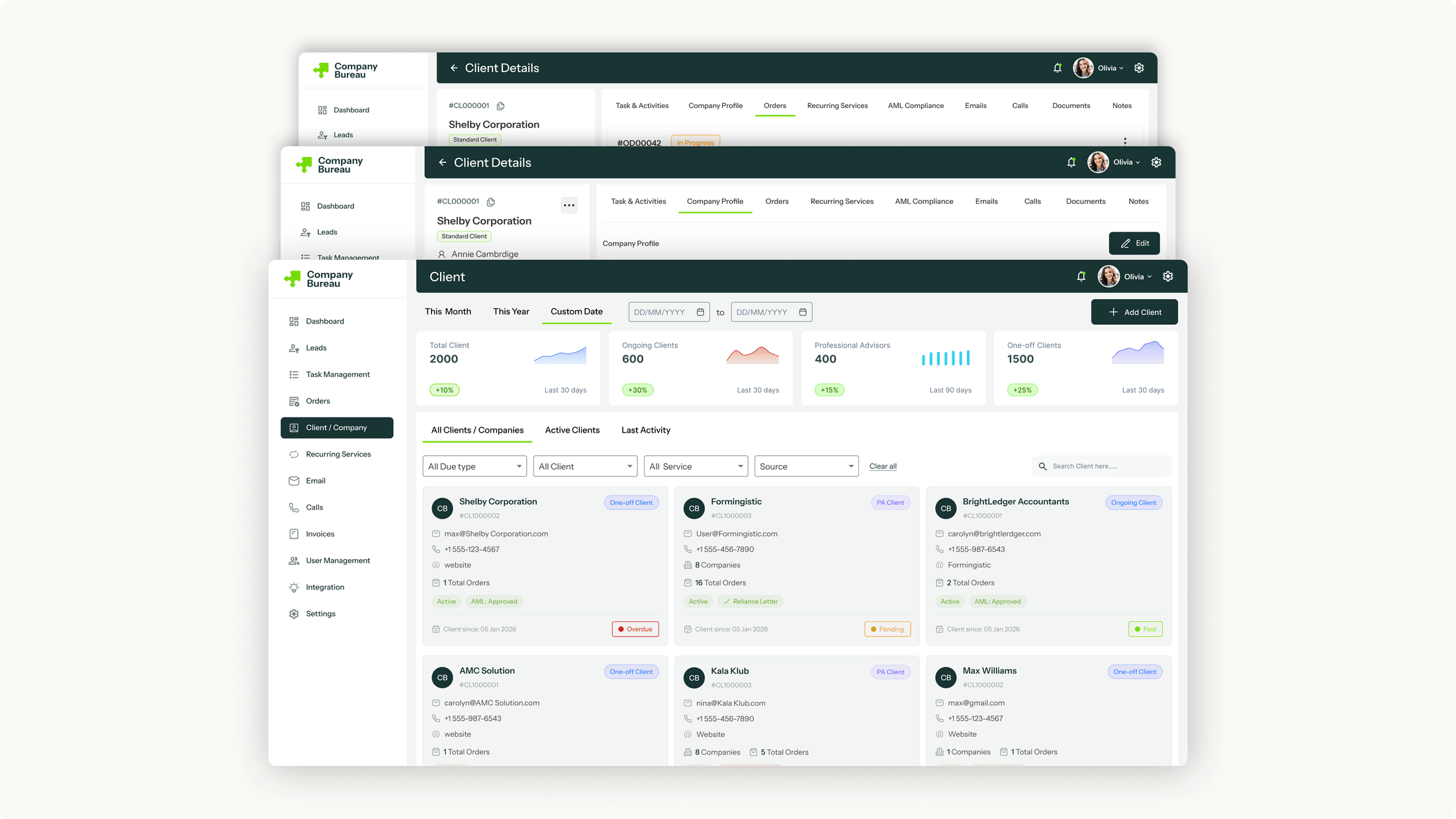
The one that ties it all together is the Client / Company record. Open a company and its whole world is on one screen — its orders, the services it's on, invoices, AML status, tasks, every email and call. Wherever a client turns up across those eleven modules, it all rolls back to that single record.
04
From lead to pack
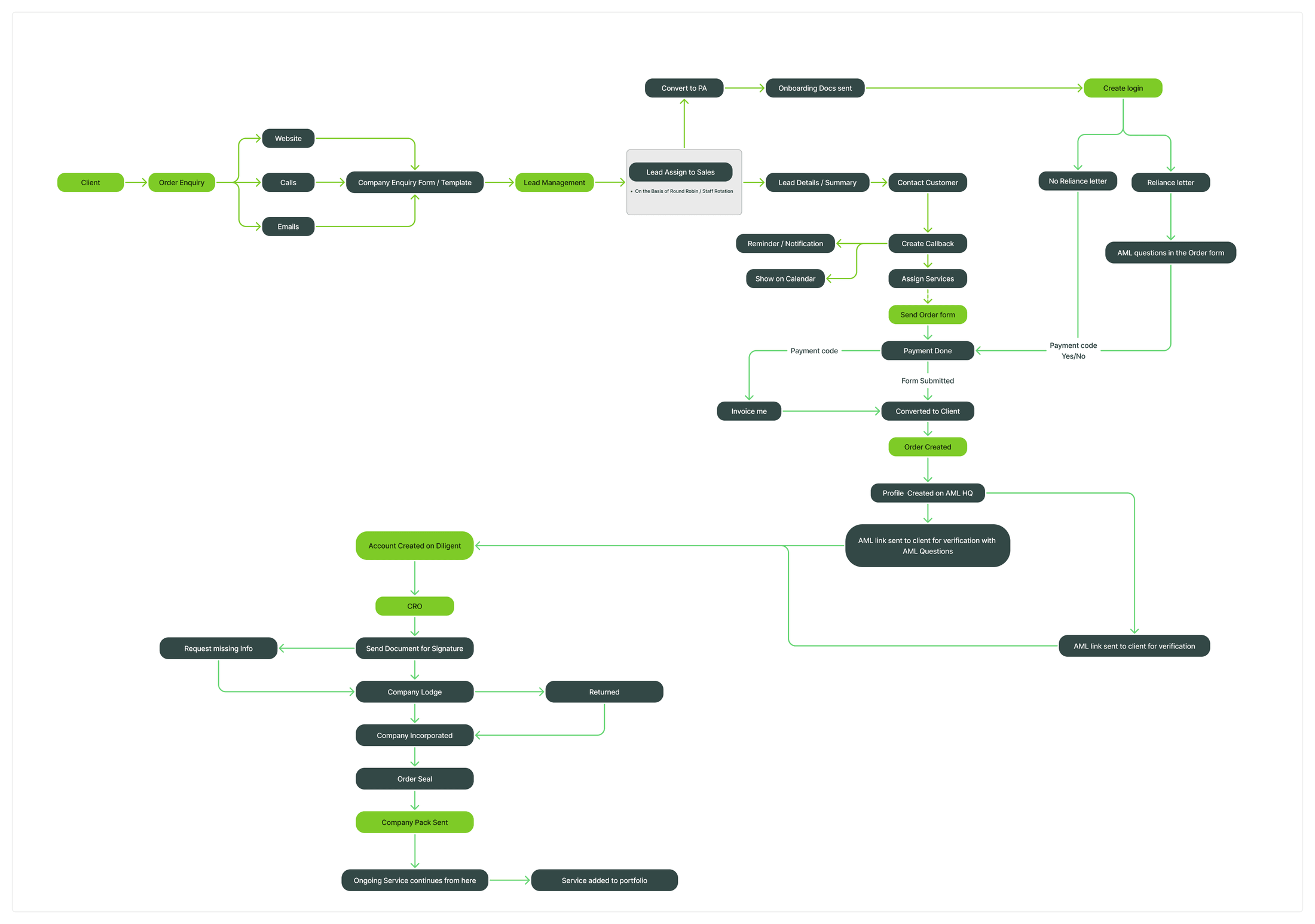
The whole path from a cold lead to a finished company pack — mapped out with the Service Manager, then built.
An enquiry becomes a lead; a salesperson works out the services; the order form goes out and gets paid; AML runs over on AML HQ; the formation moves through Diligent and the CRO to incorporated; the pack goes out; and any ongoing services roll into the client's portfolio. One path, every stage visible — including the branch for professional advisors ordering on their own.
05
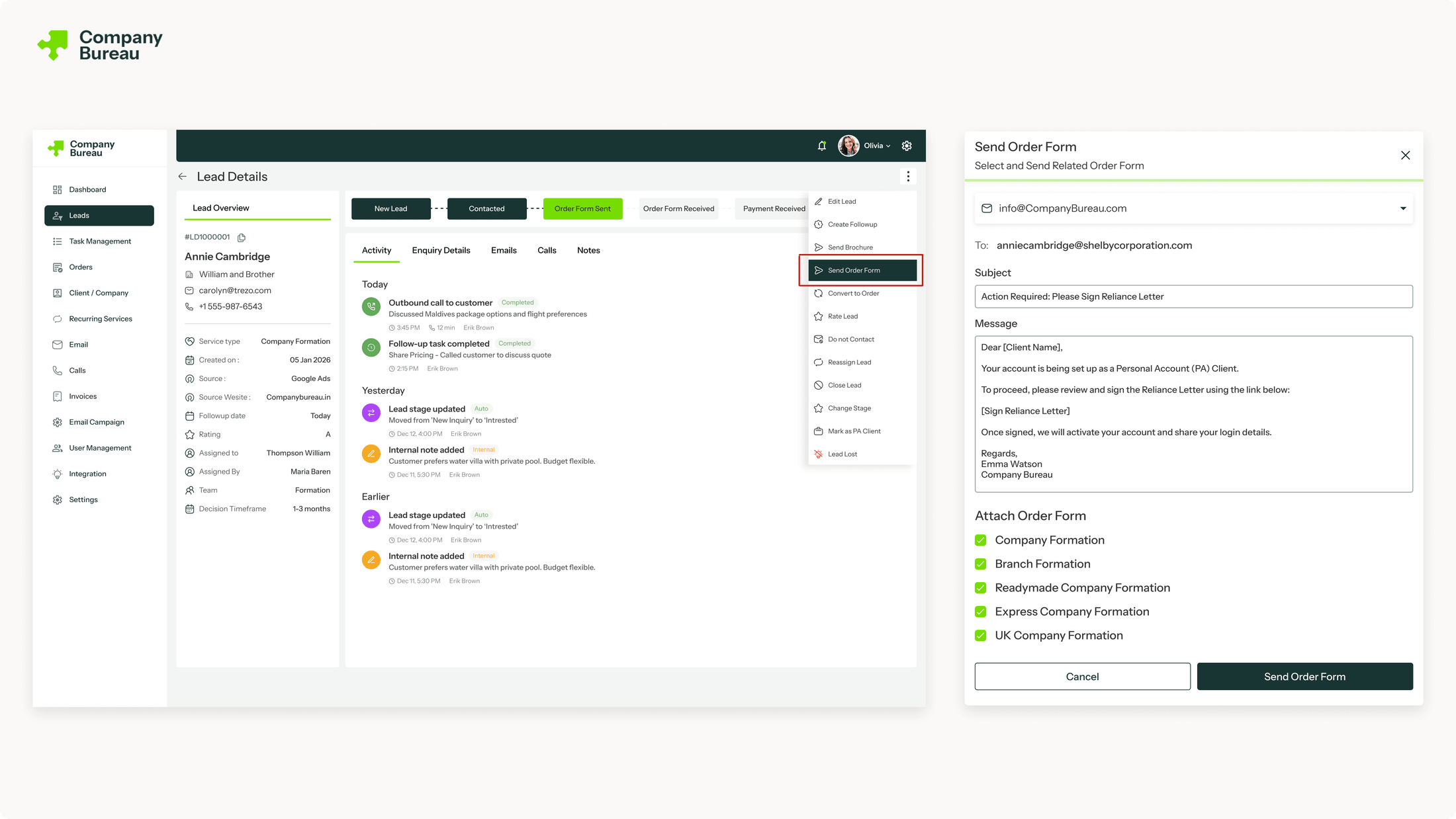
The order form
06
The whole client on one record
07
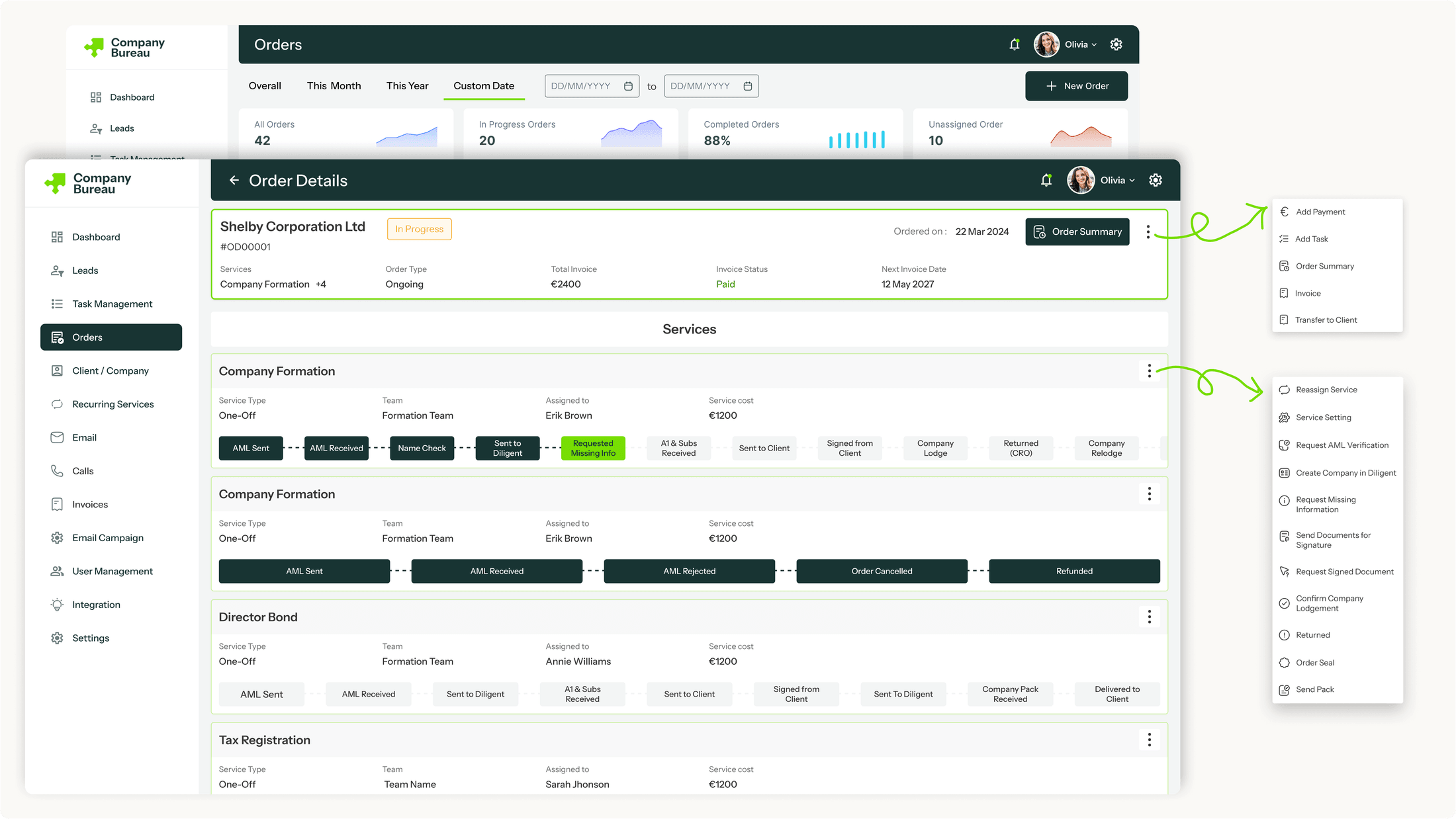
The order module
08
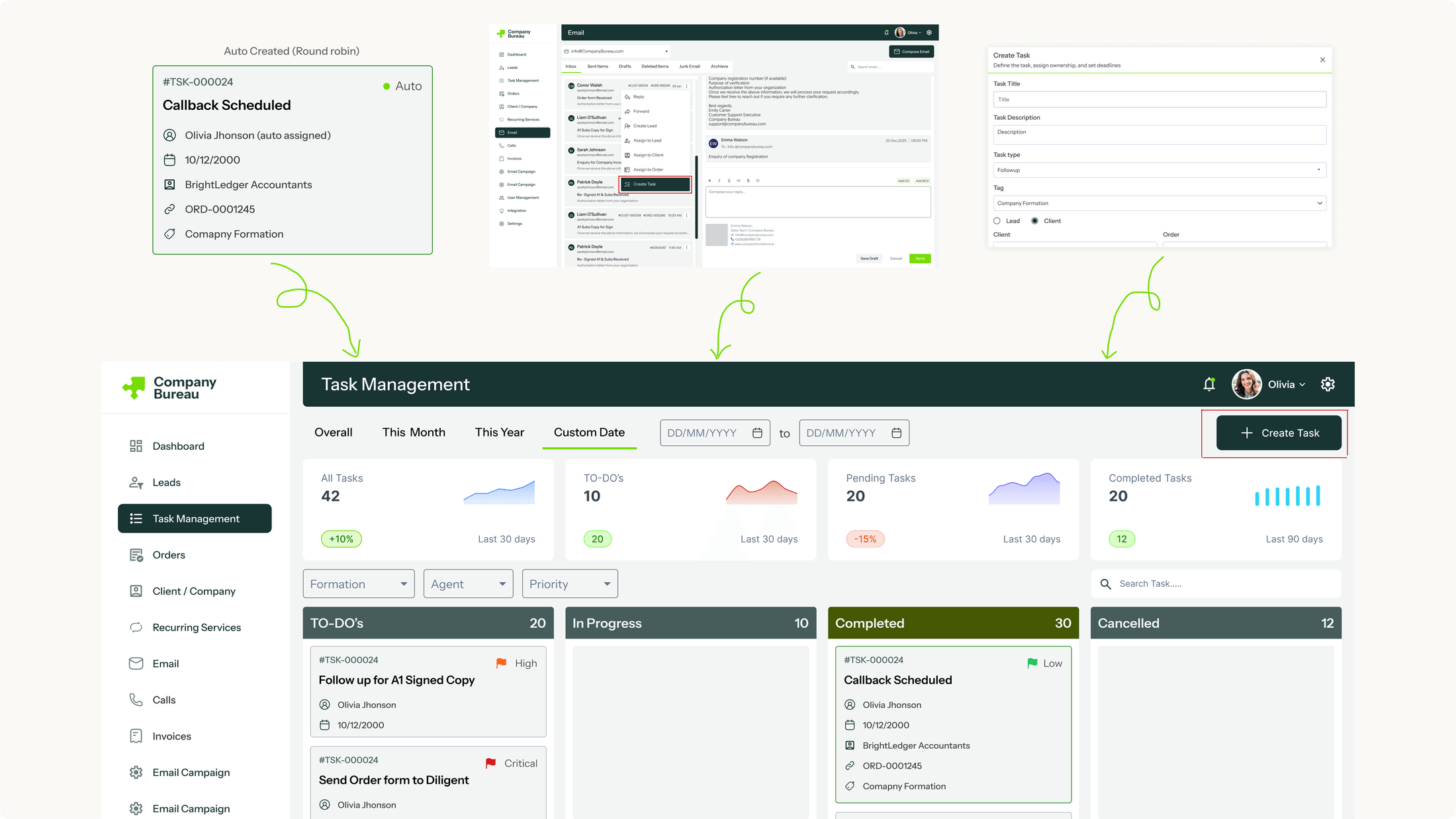
Three ways a task is born
09
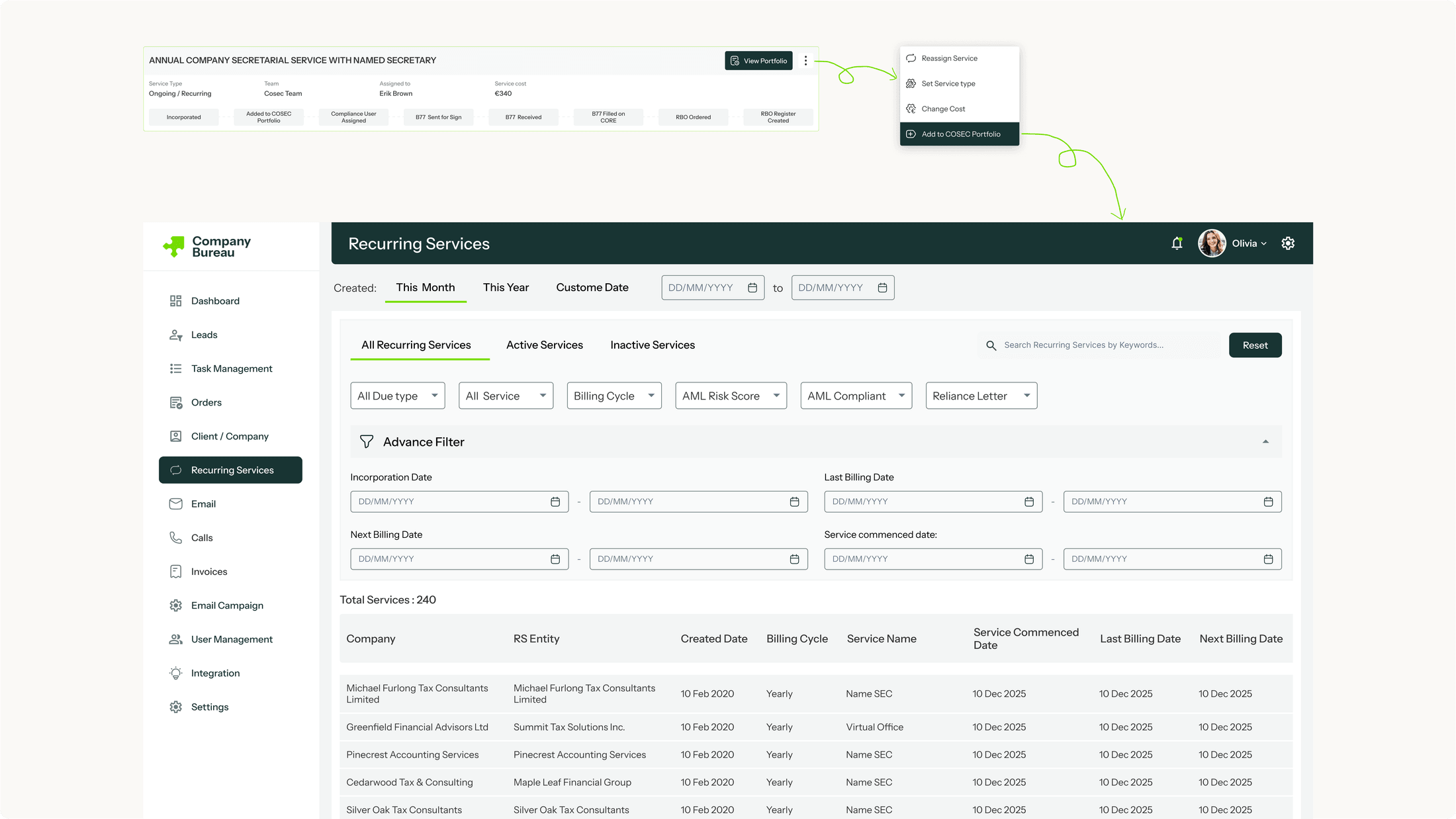
Compliance for life — the Portfolio
10
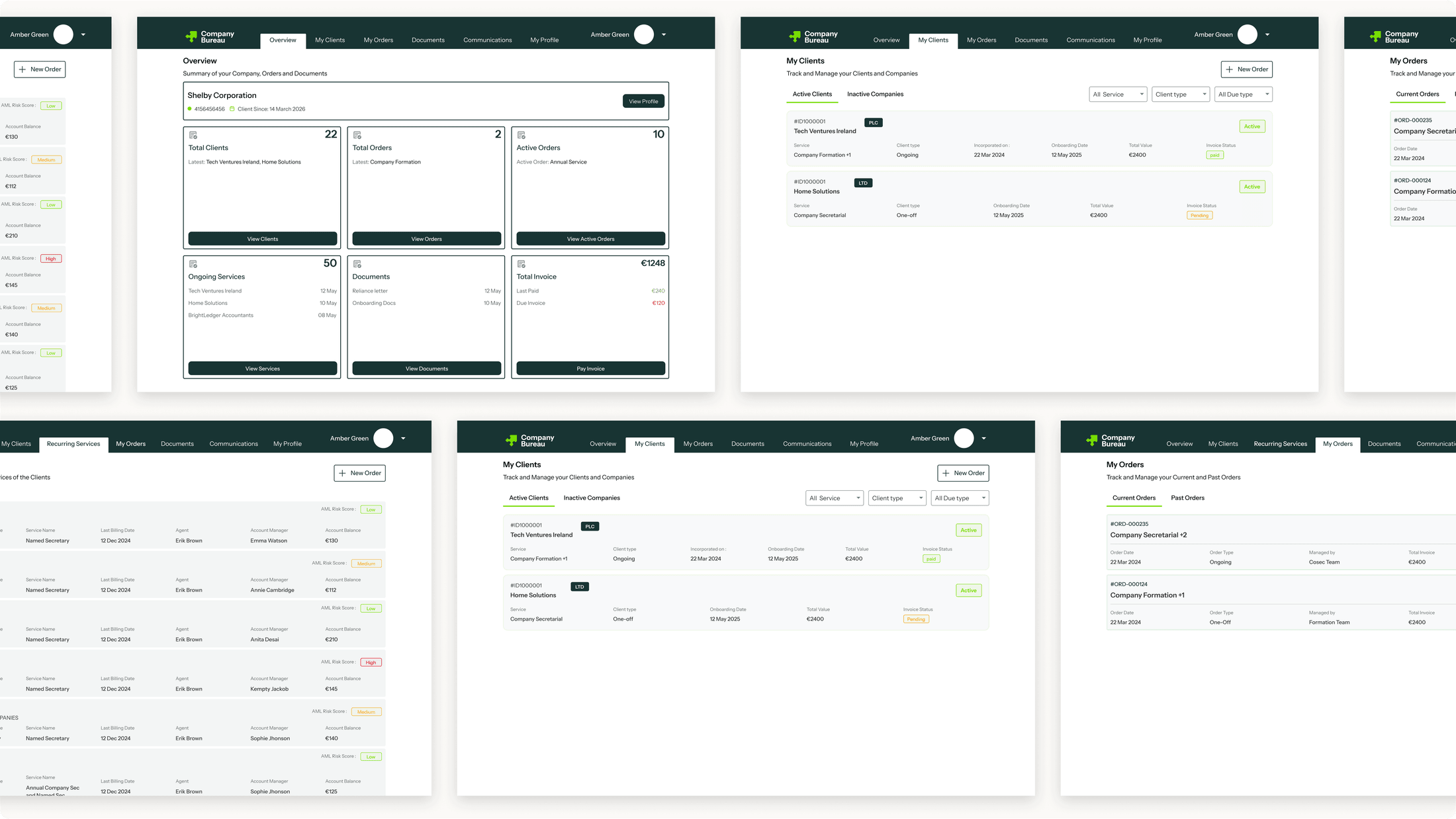
Two kinds of client — the PA path
11
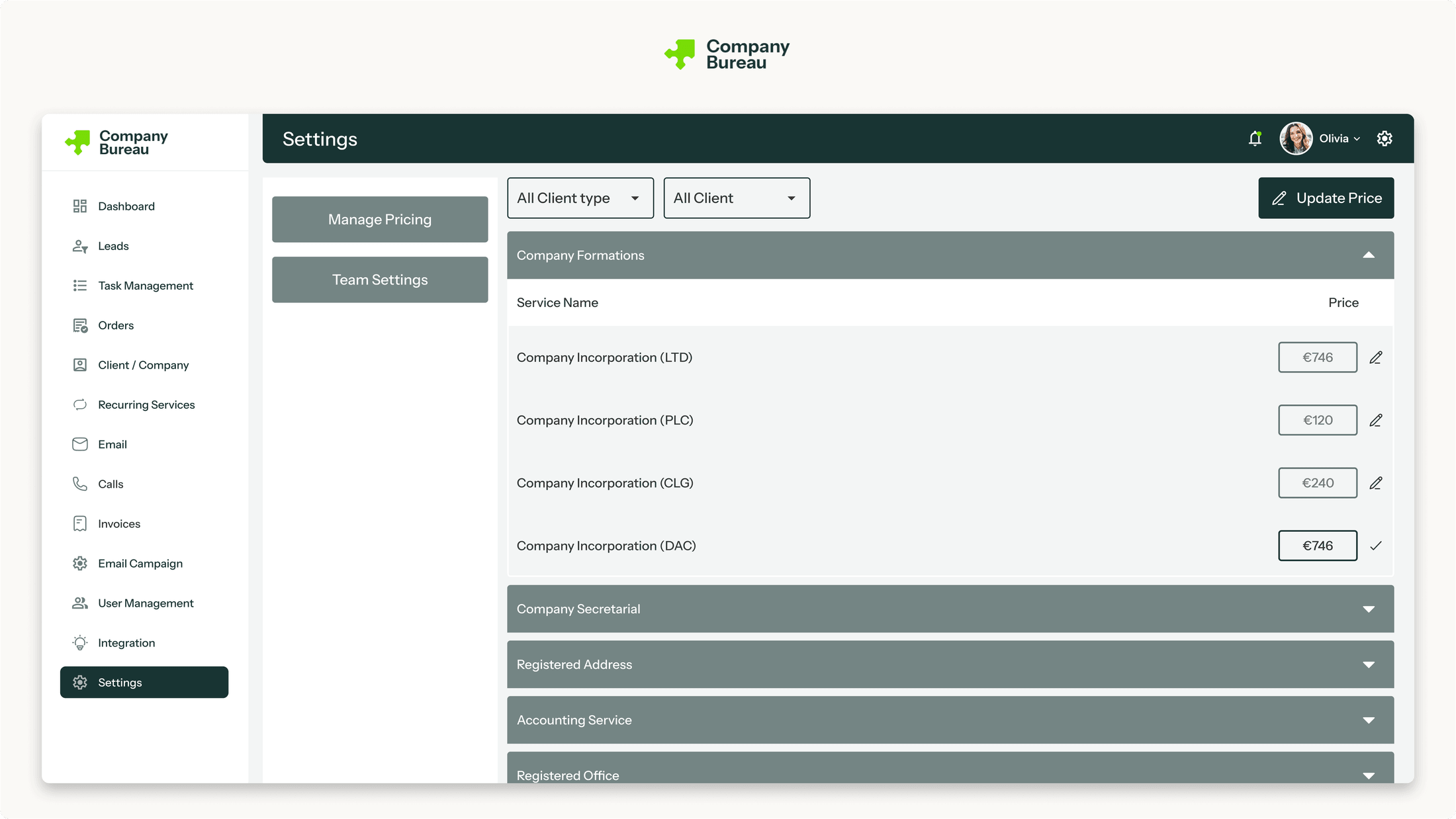
The layer that makes it run
The settings aren't the glamorous part — but they're what make the automation possible.
Pricing settings hold every service's price — including the special rates set for individual professional advisors — so invoices raise themselves with the right numbers, and nobody's keying in amounts by hand. Department settings define the teams, so a task or a notification routes itself to the right desk instead of someone deciding who gets it every time.
It's the same idea as everywhere else in the build: set it once, and let the system take it from there.
12
Before & after
The same formation — before the system, and after.
Before: an enquiry meant typing the client into Sage, then again into AML HQ, then again into Diligent. Raising the invoice over in Xero. Every update buried somewhere in Outlook. The stage tracked in a spreadsheet. Five tools and an inbox, held together by memory — and plenty of room to click the wrong thing.
After: the order goes out from the lead, and the client's details land in one place. The pipeline drives every stage, prompting the next step and logging it as you go. Billing and messages sit right on the client's record. And the second a company's incorporated, its ongoing services and tasks just set themselves up. Same formation — minus the re-typing, the hunting around, and the steps that used to fall down the gaps.
None of it's flashy, honestly. But the firm went from a pile of disconnected tools to one system that's genuinely wired together. And that's the thing that lets them move quicker, make fewer mistakes, and finally grow beyond the few people who used to keep it all in their heads.
| Before | After | |
|---|---|---|
| Systems the same order data is keyed into | 3 — the CRM, AML HQ and Diligent | 1 — entered once |
| Tools the team worked across | 5 (Sage, Xero, Outlook, Diligent, AML HQ), plus an inbox | 1 system |
| Ongoing compliance tracked in | A wall of spreadsheets | One live system (Portfolios) |
| Where a job's status lived | Spread across every tool | On one record |
Every figure here is a count of systems or steps in the design itself — not an estimate of time.
13
What it changed
The system is built and going live across the firm. The formation services — the flow the whole business starts with, enquiry through to incorporated — are tested and running, and years of client records are moving off Sage and onto the platform behind them.
What's genuinely different is that five disconnected tools became one. The platform-juggling is gone, every step gets prompted and tracked, and the status of a job doesn't sit in someone's head any more — it's on the record, where anyone who needs it can find it.
14
Reflection
What I'm proudest of here is that it holds together. Company Bureau's work spanned five separate tools and a hundred conditional rules, and the real challenge was never one screen — it was making all of it behave like a single thing. One place to work, one source of truth, one clean path from a cold lead to a delivered company.
And it made one thing clear to me: this is the work I want to do. Big, tangled, high-stakes systems, where getting the design right means a real business runs better. I'm a product designer who's happiest deep inside a hard problem, building the system that makes it all work. That's where I'm at my best — and exactly what I'm looking for next.